Breaking Down Active Directory
Inhereted from HTB - Intro to Active Directory.
Overview
Active Directory (AD) is the core directory service in Windows network environments. Think of it as a phonebook + ID card system + security guard for all your company’s computers, users, and resources.
- Directory service: Stores information about users, computers, printers, groups, and more.
- Authentication & Authorization: Verifies who you are (authentication) and decides what you can do (authorization).
- Centralized Management: Admins control security settings, user accounts, and access rules in one place instead of managing each machine separately.
ⅰ. Why is AD so important?
- Used in about 95% of Fortune 500 companies.
- Scales from small businesses to massive enterprises.
- Integrates with many other services (file servers, email, cloud).
ⅱ. Security Challenges in AD
While AD is powerful, it’s also a major attack target because:
- It controls all authentication and permissions.
- If an attacker gets Domain Admin rights, they essentially own the network.
ⅲ. Common risks
- Misconfigurations:
- AD has many settings, and mistakes can open security holes (e.g., overly broad permissions).
- Default access:
- Even a normal user can see a lot of domain information by default (e.g., group memberships, usernames).
- Weak password policies:
- Easy for attackers to brute-force or guess passwords.
Protocol vulnerabilities
- Examples:
- NoPac (2021) → privilege escalation.
- PrintNightmare → remote code execution.
- Zerologon → instant domain takeover.
- Examples:
ⅳ. Core Components of AD
Active Directory is hierarchical (tree-like) and distributed (can be spread across multiple servers). It organizes resources into logical units:
- Forest: The top-level container in AD, encompassing one or more domains. It serves as the security boundary where all objects (users, groups, computers, etc.) are managed. A forest can contain multiple domains and allows for administrative control across the entire structure.
- Domain: A domain is a sub-unit within a forest and contains objects like users, computers, and groups. Domains are the primary units for applying security policies and managing resources. They can also have child domains, allowing for a granular organizational structure.
- Organizational Units (OUs): OUs are containers within a domain that can hold users, computers, groups, and other OUs. They facilitate administrative delegation and policy application without affecting the entire domain. OUs can have nested sub-OUs, supporting hierarchical management.
- Domain Controllers (DCs): Servers that respond to authentication requests and verify users on computer networks. They store AD’s data and manage access and security.
- Groups and Group Policy Objects (GPOs): Groups simplify management by organizing users and computers with similar permissions. GPOs apply security policies and configurations to groups of users and computers across domains and OUs.
ⅴ. Hierarchical Structure of Active Directory
Active Directory is organized in a tree-like structure with forests, domains, and OUs forming a nested hierarchy. This structure supports efficient management and scalability. Here is a sample realistic structure:
1
2
3
4
5
6
7
8
9
10
11
12
13
DARKCORP.LOCAL/
├── ADMIN.DARKCORP.LOCAL
│   ├── GPOs
│   └── OU
│       └── EMPLOYEES
│           ├── COMPUTERS
│           │   └── FILE01
│           ├── GROUPS
│           │   └── Help Disk
│           └── USERS
│               └── jon.snow
├── CORP.DARKCORP.LOCAL
└── DEV.DARKCORP.LOCAL
Root domain:
DARKCORP.LOCALSubdomains:
ADMIN(administrative accounts/resources)CORP(corporate operations)DEV(development team)
Inside
ADMIN, there is an OU for employees, which contains separate folders for computers, groups, and users.
ⅵ. Security Implications and Best Practices
Active Directory’s extensive accessibility and hierarchical structure demand rigorous security measures to prevent exploitation:
- Secure Configuration: Implement secure default settings and minimize backward compatibility that might expose vulnerabilities.
- Least Privilege: Limit user permissions based on roles and responsibilities, applying the principle of least privilege.
- Network Segmentation: Divide the network into segments to contain breaches and limit lateral movement.
- Regular Audits and Patching: Continuously monitor AD configurations, apply patches, and address known vulnerabilities.
- Effective Use of OUs and GPOs: Organize objects in OUs effectively and apply GPOs to enforce security policies consistently.
AD Terminology & Objects
To work with or secure Active Directory (AD), you must first understand its language — the terms, object types, and how they fit together.
1. Key Terminology
| Term | What It Means | Why It Matters |
|---|---|---|
| Object | Any resource stored in AD - e.g., user, computer, printer, group, OU. | Everything in AD is an object. If you can enumerate objects, you can map the network. |
| Attribute | A property of an object - e.g., a user’s displayName, email, lastLogonTimestamp. | Attackers often search attributes for sensitive info (emails, descriptions with passwords). |
| Schema | Blueprint that defines which object types exist and what attributes they can have. | Misconfigurations here can cause security gaps. Schema changes are rare but impactful. |
| Domain | Logical grouping of AD objects that share a database and policies. | Primary administrative boundary for security and authentication. |
| Forest | Collection of one or more domains that share a schema & global catalog. | Acts as the security boundary - compromise at forest level = total control. |
| Tree | One or more domains that share a contiguous namespace (like corp.example.com and dev.example.com). | Organizes domains logically. |
| Container | Holds other objects, but unlike OUs, can’t have Group Policies applied. | Basic organization tool; less flexible than OUs. |
| Leaf | An object that cannot contain other objects (e.g., a single user account). | Endpoints of the directory structure. |
| GUID | Globally Unique Identifier - a 128-bit value assigned to every object when created; never changes. | Helps track objects even if renamed or moved. |
| Security Principal | An object (user, group, computer) that can be authenticated and assigned permissions. | Only security principals can be granted access rights. |
| SID | Security Identifier - a unique number identifying a security principal in its domain. | Used in ACLs instead of names for consistency. |
| DN (Distinguished Name) | Full AD path to an object. Example: cn=John Doe,ou=HR,dc=example,dc=com | Used in LDAP queries to uniquely identify objects. |
| RDN (Relative Distinguished Name) | The object’s name within its parent container. Example: cn=John Doe. | Short version of DN used for reference inside its parent. |
| sAMAccountName | Legacy logon name (max 20 chars) for older Windows compatibility. | Still important for older systems and backward compatibility. |
| UPN (User Principal Name) | username@domain - modern logon format. | Makes logging in easier and integrates with cloud services. |
| FSMO Roles | Five special roles handled by Domain Controllers for unique AD functions. | Losing FSMO roles can cause major AD issues. |
| Global Catalog (GC) | Domain Controller that stores partial replicas of all objects in the forest for fast searches. | Needed for logins that span multiple domains. |
| RODC (Read-Only Domain Controller) | DC that stores a read-only copy of AD. Useful for branch offices where security is lower. | Limits risk if stolen or compromised. |
| Replication | Process of syncing AD data across Domain Controllers. | Must be secured to prevent tampering. |
| SPN (Service Principal Name) | Identifier for Kerberos to locate a service instance on the network. | Misconfigured SPNs are exploited in Kerberoasting attacks. |
| ACL (Access Control List) | List of permissions for an object. | If misconfigured, may allow privilege escalation. |
| ACE (Access Control Entry) | A single permission entry inside an ACL. | Attackers can abuse excessive ACE rights. |
| DACL | Discretionary ACL - defines who can access what. | Misconfigurations here lead to unauthorized access. |
| SACL | System ACL - defines which actions get logged for auditing. | Helps detect suspicious activity. |
| FQDN | Fully Qualified Domain Name - e.g., server01.example.com. | DNS-based identification of a host. |
| Tombstone | A placeholder for a deleted object, kept for recovery. | Prevents accidental permanent deletion. |
| AD Recycle Bin | Allows restoring deleted objects with most attributes intact. | Useful for quick recovery after accidental deletion. |
| SYSVOL | Shared folder on DCs containing scripts and GPOs. | Critical for GPO functionality; attackers often drop malware here. |
| AdminSDHolder | Special container that protects high-privilege accounts’ permissions. | Prevents privilege escalation via ACL tampering. |
| sIDHistory | Stores previous SIDs for an object. | Used during migrations; can be abused to impersonate users. |
2. Breakdown of objects
In AD, everything is an object, but not all objects are created equal. Here’s a breakdown of major object types:
Users
- Definition: Individual accounts for people or services.
- Identifiers: Have both SID & GUID.
- Attributes:
displayName(visible name)lastLogonTimestamp(last login date/time)description(often contains dangerous info like “Password: Summer2024!”)manager(links to another user object)
- Why attackers care: A single compromised user can be the starting point for lateral movement.
Computers
- Definition: Accounts representing domain-joined machines.
- Identifiers: SID & GUID.
- Attributes: OS version, hostname, description.
- Security note: A compromised computer account can sometimes be used for silver ticket attacks.
Groups
- Definition: Containers for organizing users, computers, and even other groups.
- Types:
- Security groups → Assign permissions.
- Distribution groups → Used for email lists (no permissions).
- Scope:
- Domain Local → Permissions within the domain only.
- Global → Permissions across domains, but members must be from the same domain.
- Universal → Members from any domain in the forest; applies permissions anywhere.
Organizational Units (OUs)
- Definition: Containers for objects within a domain.
- Purpose: Organize logically, delegate admin rights, apply GPOs.
- Security note: Delegating control here can lead to privilege escalation if not properly managed.
Shared Folders
- Definition: AD objects pointing to shared directories on servers.
- Why important: Misconfigured permissions here = data leakage.
Printers
- Definition: AD objects representing network printers.
- Rarely targeted, but can be abused for lateral movement if printer drivers are vulnerable.
Foreign Security Principals (FSPs)
- Definition: Placeholders for security principals from trusted external forests.
- Used for: Cross-forest group memberships.
- Security risk: If the trust is compromised, these can be abused.
FSMO Roles & Functional Levels
1. FSMO Roles (Flexible Single Master Operations)
Active Directory is multi-master - most changes can be made on any Domain Controller (DC) and will replicate to others. But some operations must only happen on one specific DC at a time to avoid conflicts - these are handled by FSMO roles.
There are five FSMO roles, split into forest-wide and domain-wide:
i. Forest-wide FSMO Roles (one per forest)
- Schema Master
- What it does: Controls all updates to the AD schema (the blueprint of objects & attributes).
- Example: Adding a new attribute like EmployeeID to all user objects.
- Security note: Rarely changes - but if compromised, an attacker can introduce malicious attributes or backdoors.
- Domain Naming Master
- What it does: Manages adding/removing domains in the forest.
- Example: Creating a new domain dev.company.local.
- Security note: If abused, an attacker could add rogue domains to the forest.
ii. Domain-wide FSMO Roles (one per domain)
- RID Master (Relative ID Master)
- What it does: Allocates RID pools to DCs. RIDs are part of every SID.
- Example: When a new user is created, they need a unique SID - the RID Master gives out ranges of IDs to other DCs.
- Security note: If compromised, an attacker could create accounts with conflicting or duplicate SIDs.
- PDC Emulator (Primary Domain Controller Emulator)
- What it does:
- Acts as the time server for the domain.
- Handles password changes.
- Is the fallback for NTLM authentication.
- Security note: Time synchronization is critical for Kerberos. If time is off by more than 5 minutes, authentication fails - attackers could disrupt logins by messing with it.
- What it does:
- Infrastructure Master
- What it does: Updates cross-domain object references (e.g., if a user in one domain is moved or renamed, this role updates references in other domains).
- Security note: If compromised, could corrupt object references.
Key Security Tip: If any FSMO role holder is taken over, the attacker can make forest-wide or domain-wide changes.
2. Functional Levels
Determines which AD features are available based on the Windows Server version of your Domain Controllers.
- Domain Functional Level (DFL): Sets features for a single domain.
- Forest Functional Level (FFL): Sets features for the entire forest.
Why Functional Levels Matter
- Older functional levels = more legacy features & weaker security.
- Newer functional levels = more features & stronger authentication protocols.
Domain Trusts in Detail
A trust allows authentication between domains or forests so users in one can access resources in another.
A trust relationship lets users in one domain access resources in another domain.
Domains within and across forests can establish trust relationships to share resources.
Trusts can be one-way or bidirectional, allowing controlled access between domains. For example:
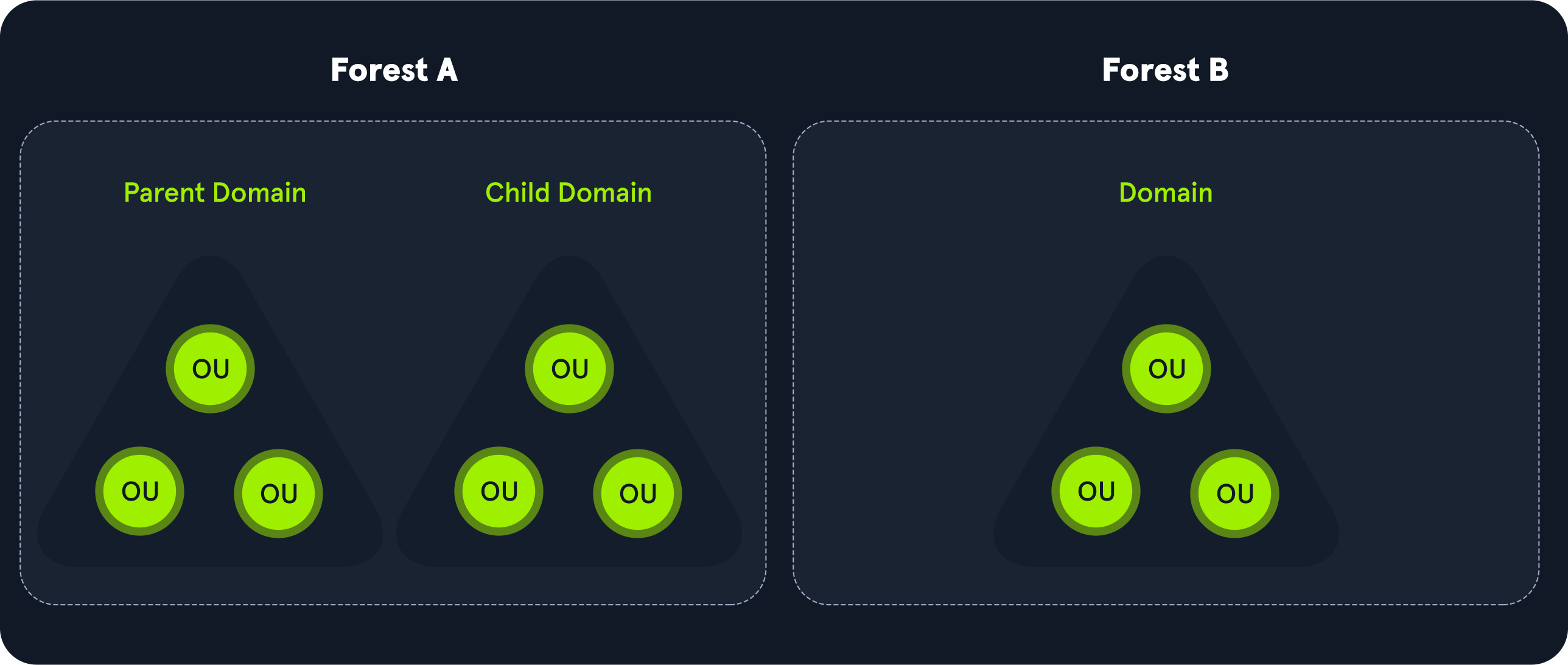
- Bidirectional Trust: Both domains trust each other, allowing mutual access.
- Child Domains: May inherit trusts from parent domains but may not have direct access to other child domains without additional trust configurations.
Trust Directions
- One-way Trust: Domain
Atrusts DomainB→ users inBcan accessA, but not vice versa. - Two-way Trust: Both domains trust each other.
- Transitive Trust: Domain
Atrusts DomainBand DomainBtrusts DomainC, so DomainAtrusts DomainC.
Trust Types
- Parent-Child Trust
- Auto-created when adding a child domain.
- Always two-way and transitive (trust extends through the chain).
- Tree-Root Trust
- Auto-created between root domains of different trees in the same forest.
- Two-way & transitive.
- Forest Trust
- Manually created between two separate forests.
- Can be one-way or two-way.
- Security risk: If one forest is compromised, it can be used to attack the other.
- External Trust
- Links domains in different forests without sharing a schema or global catalog.
- Non-transitive.
- Common for connecting to legacy systems.
- Shortcut Trust
- Manually created to speed up authentication between two domains in the same forest.
Transitive vs. Non-Transitive
- Transitive: Trust automatically extends beyond the immediate relationship.
- Non-transitive: Trust only exists between the two specified domains.
Core Protocols in AD
Active Directory is not just a database — it’s a collection of services that depend on multiple protocols working together. Here are the main ones you must understand:
- Kerberos
- Purpose: Authentication in a domain environment.
- Role in AD: Securely validates user and computer identities using tickets instead of repeatedly sending passwords.
- Strengths: Mutual authentication, replay attack protection, faster than NTLM.
- Security note: Vulnerable to ticket theft (Pass-the-Ticket), ticket forgery (Golden/Silver Ticket), and service ticket cracking (Kerberoasting).
- DNS
- Purpose: Resolves names ↔ IP addresses.
- Role in AD:
- AD requires DNS to locate Domain Controllers and services (via SRV records).
- Example SRV record:
1
   _ldap._tcp.dc._msdcs.example.com
Tells clients where to find LDAP services for the domain.
- Security note: If an attacker can modify DNS records, they can redirect authentication requests to a malicious server (DNS poisoning).
- LDAP (Lightweight Directory Access Protocol)
- Purpose: Standard protocol for accessing and managing directory data.
- Role in AD:
- Used for reading and writing AD objects.
- Example DN:
1
   cn=John Doe,ou=Users,dc=example,dc=com
- Security note:
- LDAP signing and LDAPS (LDAP over SSL) should be enforced to prevent MITM attacks.
- Without encryption, credentials in LDAP binds can be sniffed.
- MSRPC (Microsoft Remote Procedure Call)
- Purpose: Allows remote management of services over the network.
- Role in AD:
- Used for replication between Domain Controllers.
- Used in tools like net use and PowerShell remoting.
- Security note:
- Many post-exploitation frameworks (e.g., Impacket) use MSRPC to interact with AD remotely.
- Vulnerable to relay attacks if SMB signing is disabled.
Authentication Methods in AD
Active Directory primarily uses Kerberos for authentication in domain environments, but NTLM is still present for backward compatibility and certain edge cases. Understanding both is essential for security testing and defense.
1. Kerberos Authentication
Kerberos is a ticket-based authentication protocol that uses symmetric encryption and mutual authentication (both client and server verify each other). It is faster and more secure than NTLM.
Entities in Kerberos
- User (client) - Person or service requesting access.
- KDC (Key Distribution Center) - Runs on every Domain Controller; split into:
- AS (Authentication Server) - Handles initial login authentication.
- TGS (Ticket Granting Server) - Issues service-specific tickets.
- Service - The application/resource the user wants to access (e.g., file server).
Step-by-Step Kerberos Process
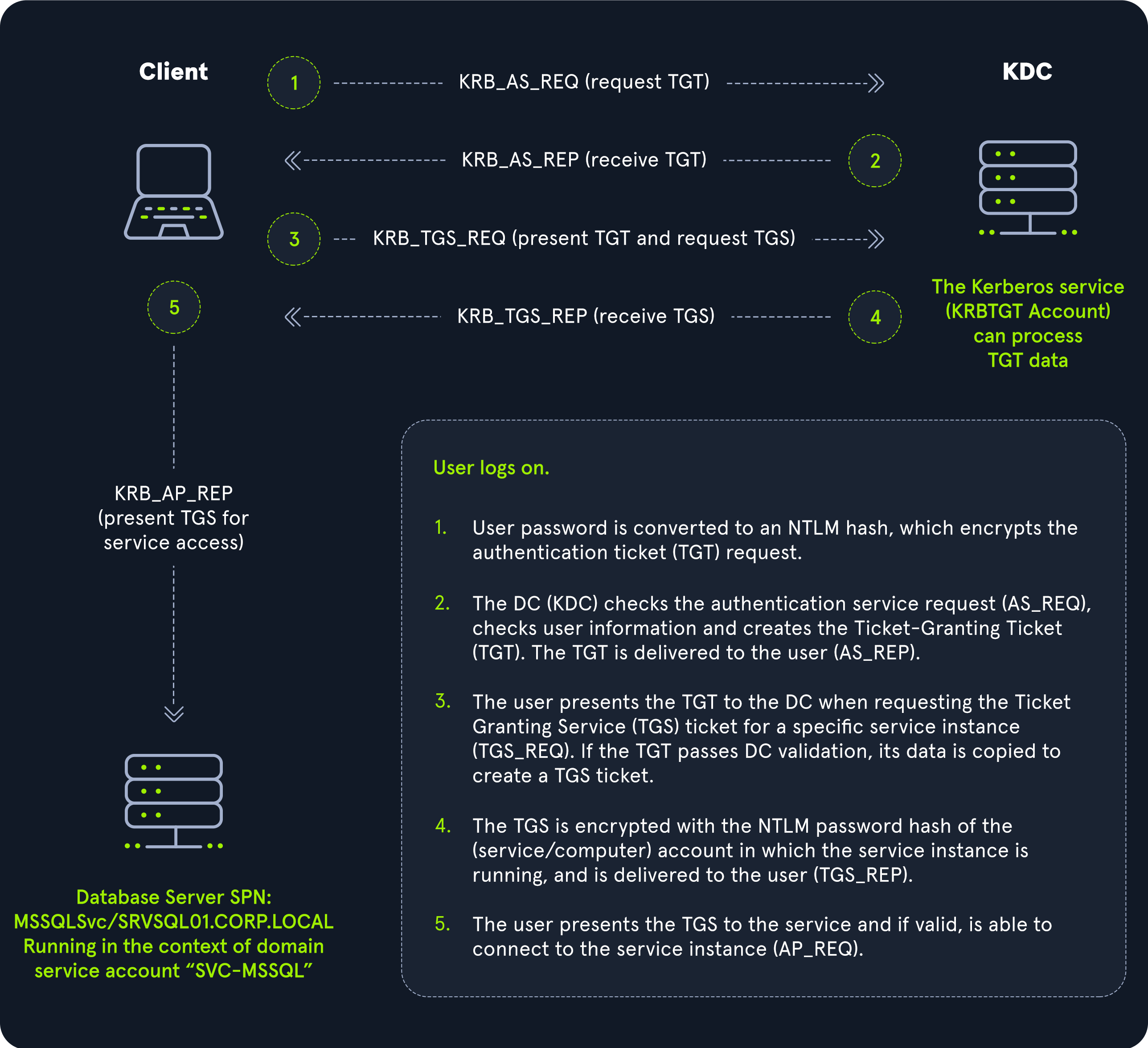
- User Logon: The user initiates a logon by entering their credentials. The system converts the password into a hash using the NT LAN Manager (NTLM) algorithm, which is then used to encrypt the Authentication Service Request (AS-REQ).
- Ticket Granting Ticket (TGT) Request: The client sends the AS-REQ to the Kerberos Key Distribution Center (KDC), which resides on the Domain Controller (DC). If the KDC can decrypt the request using the user’s password hash, it issues a TGT, which is returned to the user.
- Service Ticket Request: When the user needs to access a service, they present the TGT to the KDC, requesting a Ticket Granting Service (TGS) ticket. This request (TGS-REQ) includes details about the desired service.
- Service Ticket Issuance: The KDC verifies the TGT and issues a TGS ticket, encrypting it with the service’s password hash. This TGS ticket is sent back to the user (TGS_REP).
- Service Access: The user presents the TGS ticket to the target service (AP_REQ). If the service can decrypt the ticket with its password hash, it grants access to the user.
Diagram
Kerberos Security Notes
- Ticket Lifetime: Short validity (default ~10 hours) reduces replay attack window.
- Mutual Authentication: Prevents MITM by verifying the server’s identity.
- Attack Surface:
- Pass-the-Ticket: Stealing & reusing tickets.
- Kerberoasting: Requesting service tickets for SPNs, cracking them offline.
- Overpass-the-Hash: Using NTLM hash to get Kerberos tickets.
2. NTLM Authentication (Legacy but Still Used)
NTLM (NT LAN Manager) is an older challenge-response protocol without mutual authentication.
Still used when:
- The service is accessed via IP (Kerberos needs hostname).
- Systems are in a workgroup (no domain).
- Domain controllers are unreachable.
Step-by-Step NTLM Process
- Challenge: The server sends a unique challenge or nonce (a random number or string) to the client. This challenge is typically created using cryptographic randomness to ensure it cannot be predicted or guessed.
- Response: The client generates a response based on the challenge and its own secret (such as a password or cryptographic key). This response proves that the client possesses the correct secret without transmitting it directly over the network.
- Verification: The server verifies the response. If it matches the expected value based on the challenge and the shared secret, the client is authenticated.
NTLM Security Notes
- Weak Hashing: MD4 is outdated, vulnerable to brute force.
- No Mutual Authentication: Susceptible to MITM & relay attacks.
- Pass-the-Hash Attack: Stealing NTLM hash from memory & reusing it.
Kerberos vs. NTLM - Which Gets Used?
- Hostname access: Kerberos (if SPN is found in AD).
- IP access: NTLM (Kerberos can’t resolve SPN).
- Legacy systems: NTLM often the only option.
3. Special Case - DCC (Domain Cached Credentials)
Domain Cached Credentials (DCC), also known as MS Cache v1 and v2, are mechanisms to allow authentication on domain-joined hosts even when the domain controller is unreachable.
- Caching: Hosts cache the last ten hashes of successfully logged-in domain users in the
HKEY_LOCAL_MACHINE\\SECURITY\\Cacheregistry key. - Hash Characteristics: These hashes are not usable for PtH attacks and are notoriously slow to crack, even with powerful hardware.
- Example: A cached credential hash looks like
$DCC2$10240#bjones#e4e938d12fe5974dc42a90120bd9c90f.
- Example: A cached credential hash looks like
- Usage: Cached credentials are particularly useful for laptops and other devices that may frequently disconnect from the corporate network.
Security Practices & GPO Management
1. Group Policy Overview
Group Policy is a feature in Windows that allows administrators to configure settings across all domain-joined computers.
Local Group Policy
- Scope: Single computer.
- Use case: Workgroup PCs or local admin restrictions.
- Limitation: Not scalable for large environments.
Non-local Group Policy
- Scope: Domain-wide via AD.
- Use case: Apply security settings, software installs, scripts.
- Delivery: Policies are stored on the DC in SYSVOL and replicated.
2. GPO Structure
- GPO (Group Policy Object): The container holding settings.
- Linked to: Sites, domains, or Organizational Units (OUs).
- Processing order:
- Local Policy
- Site Policy
- Domain Policy
- OU Policy (nested OUs apply last) → Last applied wins (unless “No Override” is set).
3. Key Security Settings via GPO
- Account Policies - Password length, complexity, lockout thresholds.
- User Rights Assignment - Who can log in locally, over RDP, shut down systems.
- Security Options - Disable LM/NTLMv1, enforce SMB signing.
- Software Restriction / AppLocker - Prevent running unauthorized apps.
- Windows Firewall Settings - Enforce network rules.
4. Security Practices for AD
- Reduce Attack Surface:
- Disable unused protocols (e.g., SMBv1, NTLMv1).
- Enforce Kerberos over NTLM where possible.
- Protect Credentials:
- Use LAPS (Local Administrator Password Solution) for unique local admin passwords.
- Prevent credential theft from LSASS memory (enable Credential Guard).
- Harden Domain Controllers:
- Limit who can log in interactively.
- Keep DCs patched and isolated on a secure VLAN.
- Monitor & Respond:
- Enable auditing for logons, GPO changes, trust modifications.
- Use SIEM to detect abnormal authentication patterns.
5. GPO Security Risks
- GPO Abuse in Attacks:
- Attackers with GPO edit rights can deploy malicious scripts or scheduled tasks to all machines in the scope.
- Defensive Measures:
- Restrict GPO modification rights to a small, trusted group.
- Monitor changes to SYSVOL and GPO objects in AD.